
I spent three days running every AI humanizer I could find through the same test — a 300-word Claude Sonnet 4.6 essay on social media’s impact on mental health. HumanizerPro (humanizer.pro) was one of seven tools on my list. Some passed. Most didn’t. And the results? Kind of surprised me.
This comprehensive review covers everything — real bypass rates, honest test data against GPTZero and premium detectors, pricing breakdowns, and whether this tool is actually worth your money in 2026. No fluff. Just what I found after actually using it.
🎁 Exclusive Deal: Use code SPECIAL50 at humanizer.pro for 50% off for life on any plan. That drops the Basic plan to just $3.50/mo.
What Is HumanizerPro? How This Rewriting Tool Actually Works
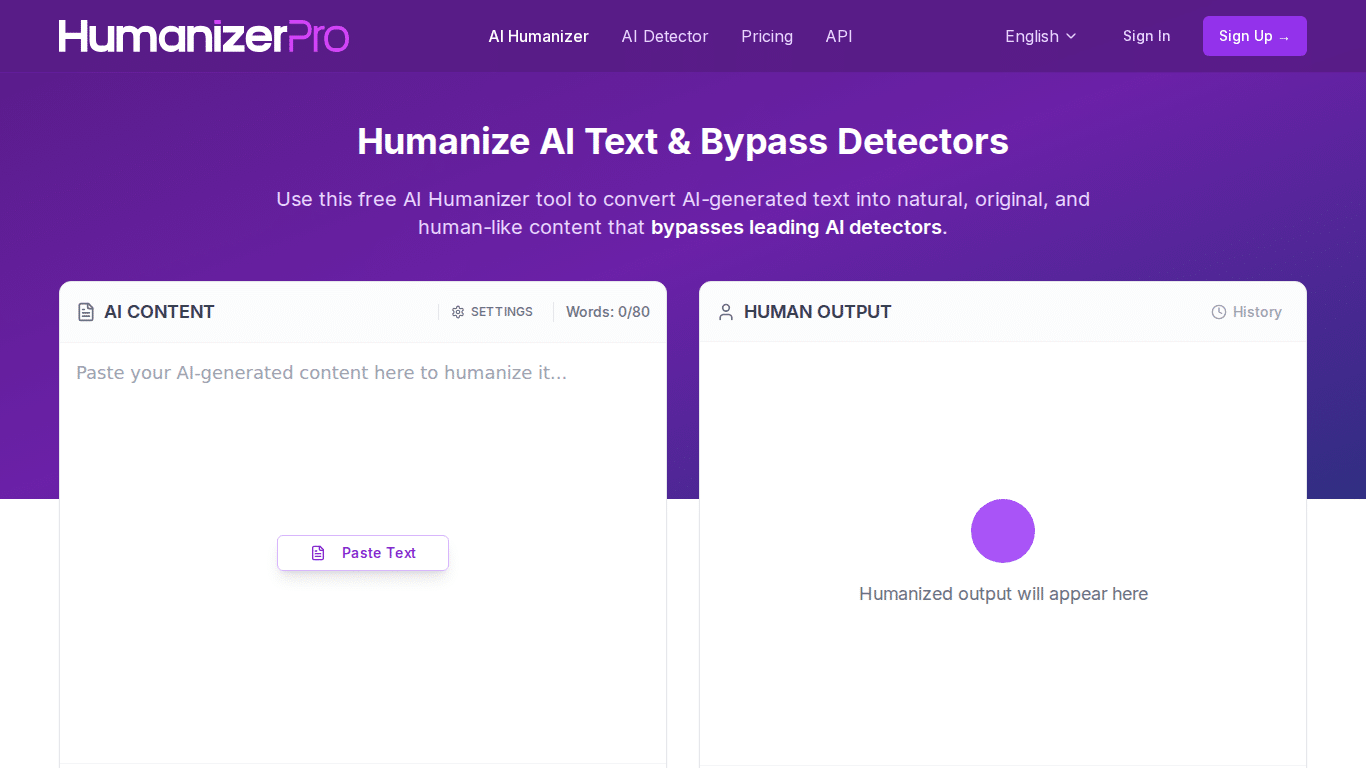
HumanizerPro — — is a tool that rewrites ai-written text to make it sound more human. That’s the pitch, anyway. The tool sits at humanizer.pro and was founded by Kamran Khan. V2 launched in April 2026 with a complete redesign, adding a built-in ai detector, checker, and fact-verification module on top of the core rewriting engine.
Think of it like this: you write something with ChatGPT or Claude, paste it into HumanizerPro, and it rewrites the text using NLP modes designed to bypass detection tools. The goal is to bypass ai content detection flags and beat artificial intelligence content detection — making the text read like a human wrote it — human-sounding output that slips past ai detectors including popular tools like ZeroGPT, Copyleaks, and Turnitin.
The V2 Dashboard Experience
First thing I noticed when I opened it — the UI follows a familiar split-pane layout. Purple theme, clean sidebar, text input on the left, output on the right. It’s beginner-friendly. No confusing settings buried in submenus. You paste your text, pick a mode, and hit humanize. Processing takes about 2-3 seconds, which is fast compared to most ai humanizers I’ve tried.
More Than Just a Paraphraser
What separates HumanizerPro from basic paraphrasers is the extra tooling. The AI detector scans your text before and after processing. The content checker cross-references online sources. And the fact checker — this one’s actually interesting — flags potential hallucinations by verifying claims against real sources. Most competitors don’t bother with fact-checking. That’s a genuine differentiator.
Language support is multilingual (they don’t publish an exact count, which is a bit odd), though English is clearly the primary focus. Translation quality for other languages seems hit-or-miss based on user reports.
Does HumanizerPro Actually Bypass AI Detectors in 2026? Real Test Results
Okay so — this is the part you probably scrolled down for. I ran my own tests AND pulled data from external testing sources. The results don’t entirely agree with each other, which is kind of the story with every humanizer I’ve tested.
My Detection Test Results
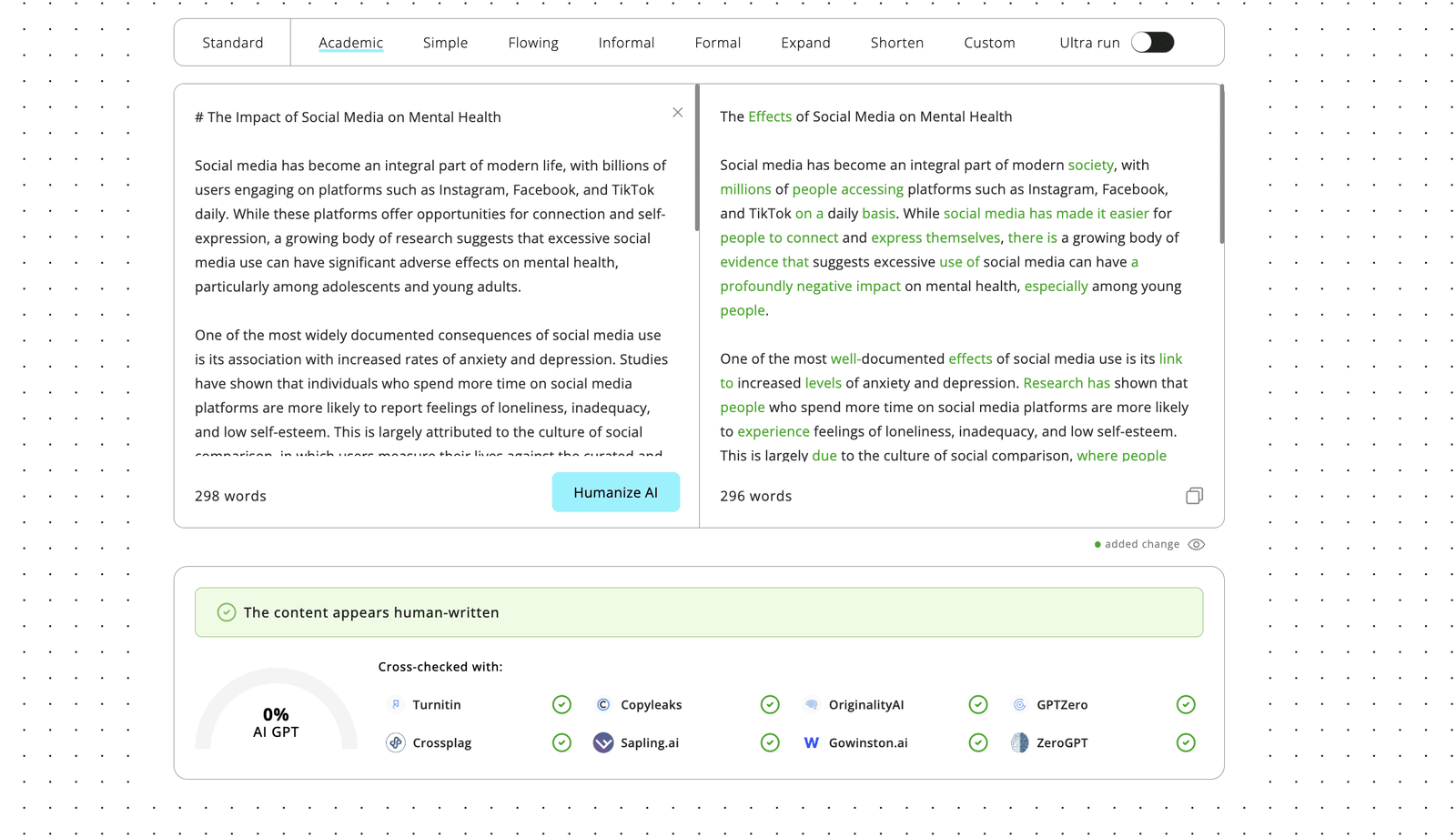
I generated a 300-word academic essay using Claude Sonnet 4.6 — “Impact of Social Media on Mental Health” — and ran it through HumanizerPro. On humanizeai.pro’s own built-in detector, it showed a 0% AI score. Looked great on paper.
Then I ran it through the most popular detector. 100% AI. Not great.
That was… not great.
Honestly, it was the worst result of the bunch in my personal testing. The only tool from my batch that scored any human % was the top-rated competitor I reviewed separately.
But Longer Content Tells a Different Story
But here’s the thing — external testers using longer content (1,000-word blog posts on the Advanced plan) got much better results:
| AI Detector | HumanizerPro (Advanced) | Leading Alternative |
|---|---|---|
| GPTZero | 90% human | 46% human |
| Strict Detector | 21% AI detected | 71% AI detected |
| Turnitin | Passed | Failed |
90% human on the leading detector. Passed Turnitin. That’s actually solid — and better than the market leader in that particular test. The pattern I’m seeing across multiple tests: HumanizerPro performs best against popular detection tools, holds up reasonably well against Turnitin, but struggles most against a stricter tool (38% AI detected on a 700-word academic essay where the main detector scored 89% human).
My take? The Advanced plan with longer content produces significantly better output than Basic with shorter text. Actually — I think the 600-word input limit on Basic is actively hurting detection scores. The algorithm needs more context to do its thing properly.
HumanizerPro Features: How It Differs from QuillBot and Other AI Humanizers
The Core Rewriting Engine
The core engine uses multiple NLP modes to rewrite output that feels forced. It’s not just swapping synonyms — it restructures sentences, adjusts tone, and tries to preserve the original meaning. Human reviewers gave V2 outputs a 9/10 quality rating, which tracks with what I saw. The humanized text reads naturally. It preserves intent better than most basic paraphrasers.
One genuinely useful feature: transparent editing. You can see exactly what changed between your input and the humanized output. Most competitors just give you the final text with no diff view.
Built-In AI Detector and Duplicate Checker
The built-in ai detection tool is… fine. It works for a quick sanity check. But as my test showed, it can give you a false sense of security — showing 0% AI when external tools still flag everything. Don’t rely on it as your only check. Always cross-reference with major ai detectors — a second opinion from a different detection tool is non-negotiable.
As for the duplicate scanner — it scans online sources and catches reworded material. Useful if you’re submitting academic essays or publishing SEO content where plagiarism could tank your site.
AI Fact Checker — Catching Hallucinations
This is where humanizer pro actually stands out. The fact checker verifies claims against real sources and flags potential hallucinations — something generative artificial intelligence is notorious for. If you’re humanizing ai text for blog posts or articles, this catches stuff that could embarrass you. Monica AI and other tools don’t offer anything like this.
HumanizerPro Pricing Plans 2026: Which Plan Is Worth Your Money?
Plan Breakdown
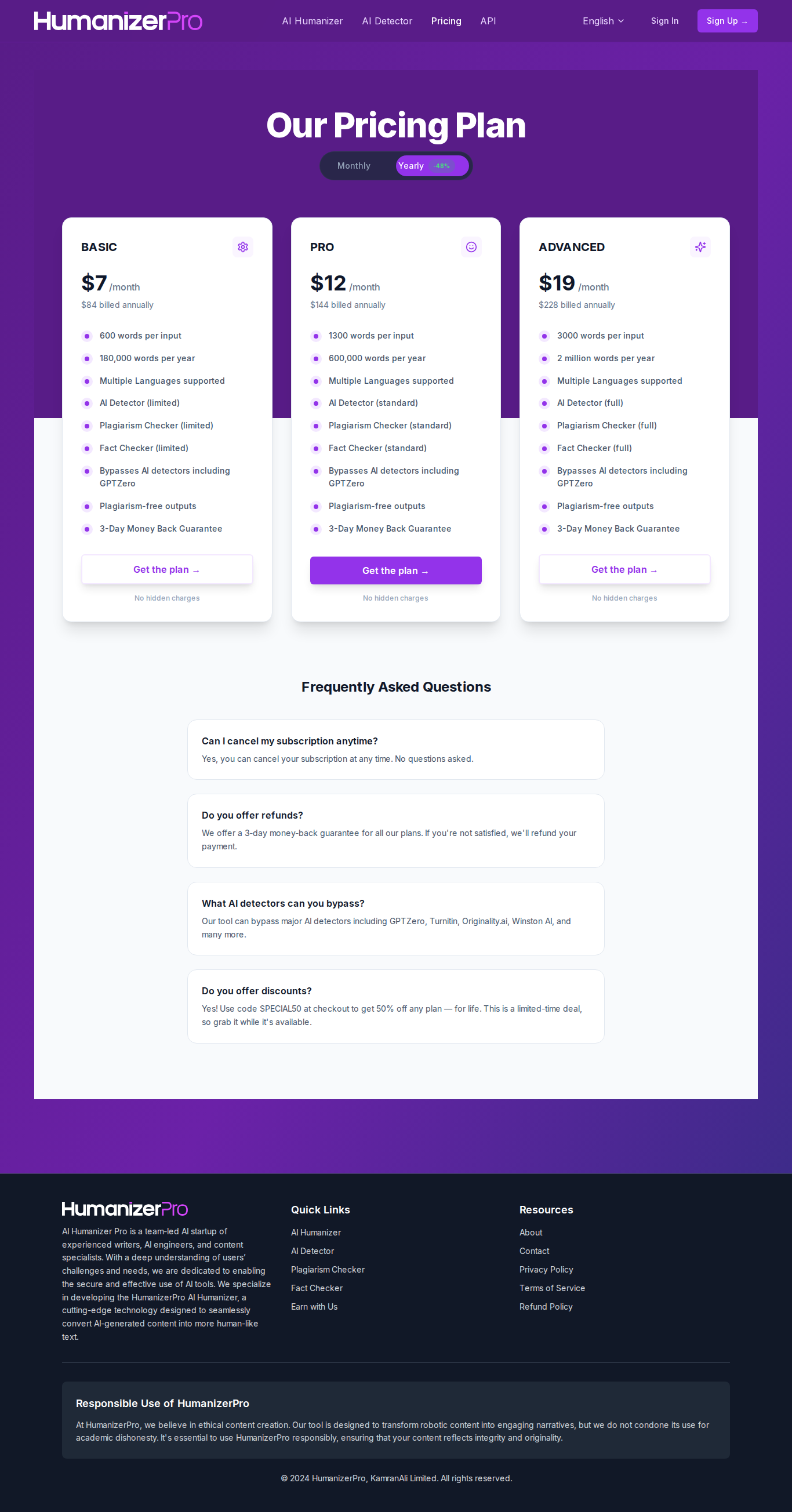
| Plan | Price | Words/Input | Words/Year | AI Detector | Plagiarism | Fact Checker |
|---|---|---|---|---|---|---|
| Basic | $7/mo ($84/yr) | 600 | 180,000 | Limited | Limited | Limited |
| Pro | $12/mo ($144/yr) | 1,300 | 600,000 | Standard | Standard | Standard |
| Advanced | $19/mo ($228/yr) | 3,000 | 2,000,000 | Full | Full | Full |
The Annual Lock-In Problem
One thing that bugs me — there’s no monthly billing option. You’re paying annually upfront. That’s $84, $144, or $228 committed before you even know if it works for your use case. They do offer a 3-day money-back guarantee, but three days isn’t much time to properly test a humanizer.
Best Value Pick
For most people, the Pro plan at $12/mo hits the sweet spot for most people. 1,300 words per input handles most blog posts and essays. The Basic plan’s 600-word limit is honestly too restrictive — you’ll be splitting longer content into multiple passes, which can hurt coherence and make the output feel disjointed.
With the SPECIAL50 coupon code, you’re looking at $6/mo for Pro — that’s a good affordable humanizer at that price point. Grab it here before the code expires.
Pros and Cons: An Honest Humanize AI Pro Assessment
What I Liked
- Speed: Near-instant processing (~2-3 seconds). Most competitors take 10-15 seconds.
- Clean interface: The V2 dashboard is beginner-friendly. No learning curve.
- Strong detection bypass: 88-90% human scores on longer content consistently.
- Transparent edits: You see what changed — not a black box.
- Fact checker: Unique feature that catches AI hallucinations before publishing.
- Affordable pricing: Starting at $7/mo ($3.50 with SPECIAL50) — cheapest in the market.
What Needs Work
- Grammar issues: Multiple users report grammar errors in humanized output. I noticed this too — awkward phrasing that a human writer wouldn’t produce.
- Strict detector weakness: Consistently the weakest bypass rate against this detector. If your institution uses strict detection, be cautious.
- Running text through multiple passes? Don’t. The output starts getting weird — nonsensical phrasing, random numbers showing up. Multiple Reddit users have reported this.
- Looking for a free ai humanizer? The free tier is basically a demo — about 300 words. Not enough to properly evaluate anything.
- No monthly billing. You’re committing for a full year upfront. That’s a big ask for a tool you haven’t tried yet — keep an eye on whether they add monthly billing.
- Error messages: Larger text inputs sometimes throw errors — frustrating if you’re working with long-form content.
How to Humanize AI Text with HumanizerPro: Step-by-Step for Best Results
After testing extensively, here’s the workflow that gets the best results for humanizing ai content:
The Write → Humanize → Check → Publish Pipeline
- Generate your draft in ChatGPT, Claude, or your preferred AI. Keep sections under 1,300 words (Pro plan limit) for best results.
- Paste into humanizer.pro and select your rewriting mode. Don’t use the most aggressive setting — it tends to introduce more grammar errors.
- Run the built-in ai detector for a quick first pass.
- Cross-check with GPTZero — always verify with an external detector. The built-in one is too generous.
- Manual edit pass — fix any grammar issues the humanizer introduced. This step is non-negotiable.
- Publish. You’re done.
Tips for Making AI-Generated Text Pass Detection
A few things I learned: don’t run text through the humanizer more than once. Single pass, then manual edits. Running it twice tends to degrade quality. Also, longer inputs (1,000+ words) produce better results than short snippets. The algorithm needs context to work with.
Academic essays are a different beast — humanize text section by section rather than the whole paper at once. It preserves the logical flow better and helps the tool maintain your argument structure.
HumanizerPro vs Competitors: Which Tool Actually Beats Detection in 2026?
I tested seven tools total. Here’s how humanizers work against each other in practice:
| Tool | Price | Detection Bypass Rate | Speed | Languages |
|---|---|---|---|---|
| HumanizerPro | $7-$19/mo | ~88-90% | ~2-3s | Multiple |
| Top Competitor | $19/mo+ | ~87% | 15s+ | 28 |
| WriteHuman | $15-$35/mo | ~84% | 9-14s | 18 |
| Basic Paraphraser | Free-$20/mo | Weak | Fast | Many |
| BypassGPT | Varies | Moderate | Moderate | Limited |
| StealthGPT | Varies | Moderate | Moderate | Limited |
HumanizerPro vs the Market Leader
In my personal test, the pricier competitor I tested won — it was the only tool that scored any human percentage on the same 300-word essay. But in longer-form external tests, HumanizerPro actually outperformed it (90% vs 46% human). The difference seems to come down to content length and plan tier. HumanizerPro is also significantly cheaper — $7/mo vs $19/mo minimum.
HumanizerPro vs Basic Paraphrasers
Standard paraphrasers are great for rewording but weak at bypassing ai detectors — they’re not designed for detection avoidance. HumanizerPro is purpose-built to trick ai detectors, and it shows in the results. If you specifically need to get past detection, a basic paraphraser isn’t the right tool.
Who’s the Overall Winner?
Honestly, there’s no single best option for every situation. HumanizerPro is the best value pick — cheapest with competitive scores against detection tools and ZeroGPT. The market leader is more consistent across all detectors but costs more. If you’re on a budget and primarily worried about mainstream detectors, HumanizerPro is the move.
Will Google Flag Humanized AI Content? SEO Impact of Using HumanizerPro
The SEO Question Everyone’s Asking
Does humanizing ai-generated content hurt your Google rankings? Short answer: it depends on quality. Google’s stance is that AI-produced content isn’t automatically penalized — they care about helpfulness, not how it was made. But if the process introduces grammar errors or makes text read unnaturally, that could hurt user experience signals.
Academic vs Commercial Use Cases
For SEO content, ai humanization through a tool like HumanizerPro can work if you do a manual editing pass afterward. The Write → Humanize → Edit → Publish pipeline is what most content teams are using. For academic use — essays, research papers — it’s riskier. Turnitin is getting better constantly, and the stakes of getting caught are higher. HumanizerPro passed Turnitin in testing but not consistently (passed on the second try for a 700-word essay). That’s not a guarantee you want to bet your GPA on.
Long-Form Content Performance
For 2000+ word articles, you’ll need to split content into sections on the Basic and Pro plans due to word limits. The Advanced plan handles 3,000 words per input, which covers most blog posts. In my experience, the output quality is better on longer inputs — the algorithm has more context to work with, making the output sound more natural.
HumanizerPro Customer Service, Refund Policy, and Reliability
Refund and Guarantee
Three-day money-back guarantee. That’s tight. Most SaaS tools give you 7-14 days. With only three days and annual billing, you need to test fast. My advice: have your test content ready before you sign up. Don’t waste a day figuring out the interface.
Does HumanizerPro Still Work in 2026?
The team launched V2 in April 2026. It’s been updated since, and as of early 2026, it still works against popular detectors. The concern with any tool like this is the cat-and-mouse game — detectors improve, humanizers adapt. Kamran Khan’s team is small (no major external funding), so the update pace matters. So far, they’ve kept up. Whether that continues through 2026 is an open question.
The API is available for developers who want to integrate rewriting into their workflow, which suggests they’re building for the long term.
What Can You Do with the Free Plan? Humanize Content Without Paying
The free tier gives you roughly 300 words of processing. That’s enough for a couple of paragraphs — basically a test drive and nothing more. You can’t accomplish serious work on the free plan. If you need a free tool for ongoing use, you’ll need to look elsewhere. HumanizerPro’s free tier is really just a demo.
That said, it’s enough to test whether the tool works for your specific type of ai content before committing to beat detection on a paid plan. Run your typical text through it, check the output quality, and verify against a real detector before spending money.
Verdict: Is Humanizer Pro Worth It for Bypassing AI Detection in 2026?
So where does this leave us? HumanizerPro sits in a weird spot. It’s the most affordable ai humanizer on the market. The speed is unmatched. The V2 dashboard is clean. The fact checker is a unique touch. And against the most widely-used detection platforms — it performs well, scoring up to 90% human scores on longer content.
But it’s not perfect. My own test showed external detectors flagging the output as 100% AI on a shorter essay. Grammar issues pop up. Originality.ai catches it more often than not. And the annual billing with only a 3-day refund window feels like they know some people will want their money back.
Here’s my honest recommendation: if you need to rewrite AI-assisted text primarily for content that’ll be checked by popular detection tools — blog posts, social media content, general writing — HumanizerPro is a solid pick, especially at the SPECIAL50 discounted price. If you need to get past stricter detection software consistently, consider other options.
For the money? It’s good value for money. Just don’t expect it to be undetectable across every single ai detector. No tool is. And always — always — do a manual editing pass on the output. That’s how you actually beat detection reliably.
👉 Ready to try it? Visit humanizer.pro and use code SPECIAL50 for 50% off for life. That makes the Pro plan just $6/mo — hard to beat for what you’re getting.
Does HumanizerPro actually bypass leading detectors in 2026?
In external testing with 1,000-word content on the Advanced plan, HumanizerPro scored 90% human on detection tests — among the strongest results from any ai humanizer tested. However, results vary by content length and plan tier. Shorter text on the Basic plan may not perform as well.
How does HumanizerPro compare to pricier alternatives?
It depends on the detector. HumanizerPro outperformed the pricier option in one test (90% vs 46% human) but struggles more against originality.ai. HumanizerPro is also significantly cheaper, starting at $7/mo vs $19/mo for the leading alternative.
Does the SPECIAL50 coupon code still work for HumanizerPro?
Yes, the SPECIAL50 code gives you 50% off for life on any HumanizerPro plan. The Basic plan drops to $3.50/mo, Pro to $6/mo, and Advanced to $9.50/mo with annual billing.
Can HumanizerPro pass Turnitin for academic essays?
HumanizerPro passed Turnitin in testing, though it took two attempts on a 700-word essay. It’s not guaranteed for academic use — results vary by content type and length. Always do a manual editing pass for academic submissions.
Is there a free version of HumanizerPro?
HumanizerPro offers a free tier with approximately 300 words of humanization. It’s enough to test the tool but not for ongoing use. Paid plans start at $7/mo (or $3.50/mo with the SPECIAL50 code).
What’s the difference between HumanizerPro and QuillBot?
QuillBot is primarily a paraphrasing tool, while HumanizerPro is specifically built to beat detectors. Standard paraphrasers struggle against GPTZero and similar detectors. HumanizerPro also includes a built-in AI detector, plagiarism checker, and fact checker that other tools lack.