
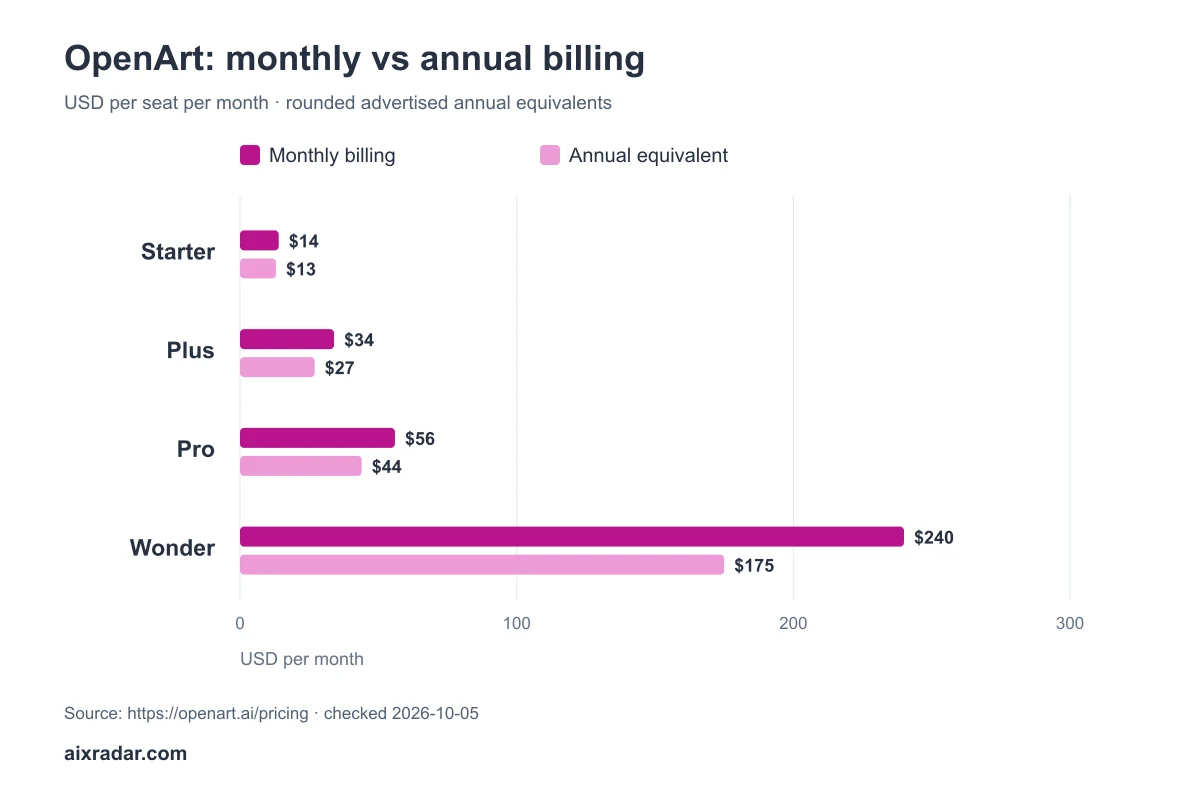
OpenArt’s monthly individual plans currently start at $14 per seat. The annual view shows lower monthly equivalents, while the credit allowance depends on the tier. The central budgeting question is how many credits your chosen model and editing workflow use, not the largest “up to” image count on a plan card.
We checked both public billing views on 5 October 2026. This guide explains plan costs, editing allowances and the budget for approved final assets, using labelled calculations.
OpenArt AI pricing by plan
| Individual plan | Monthly billing per seat | Annual displayed monthly equivalent | Credits/month |
|---|---|---|---|
| Starter | $14 | $13 | 4,000 |
| Plus | $34 | $27 | 12,000 |
| Pro | $56 | $44 | 24,000 |
| Wonder | $240 | $175 | 106,000 |
OpenArt pricing and credit FAQ · checked 5 October 2026.
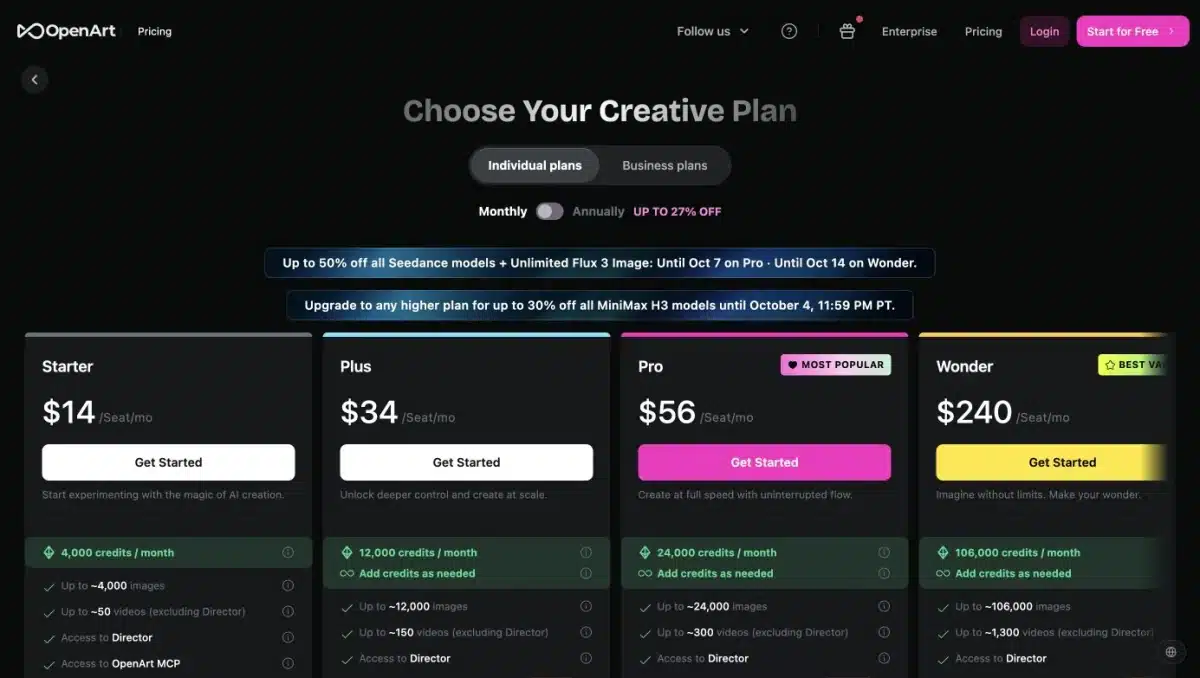
Do not multiply a rounded monthly equivalent and assume it is the exact annual invoice. Check the checkout total and selected seat count. Temporary model campaigns on the page also have their own end dates; they should not be treated as permanent benefits of annual billing.
How OpenArt credits affect generation costs
Credits provide a common budget across different creative actions, but they do not establish a fixed price for every image. Model choice, video generation, stories and editing can produce different usage patterns. The page’s maximum output counts are estimates, not guaranteed usable outputs.
Before comparing tiers, write down the workflow you intend to repeat: draft candidates, selected images, edits and final exports. Inspect the credit quote for each relevant action. An inexpensive first draft can become a more expensive finished asset after several revisions.
A transparent image-budget example
Consider a hypothetical model charging 20 credits per candidate image. Four candidates for one final asset would cost 80 credits before editing. A 4,000-credit allowance would support fifty such candidate batches. The 20-credit rate is an assumption for the example, not a quoted OpenArt model price.
At the $14 monthly Starter price, allocating the subscription across fifty usable assets would be $0.28 each. If only half the batches yield something usable, the allocation doubles to $0.56. This calculation excludes other credit-consuming steps, taxes and your time.
The lesson is to budget from usable assets rather than the number of generation requests. Replace the assumed rate with the current model quote and add a reserve for revisions. For a campaign needing twenty polished images, a small plan may be adequate if the workflow is inexpensive; it may be insufficient if you repeatedly regenerate video or high-cost scenes.
Budget a campaign rather than a maximum image count
For a set of twenty branded blog covers, specify the required aspect ratio, brand colours, legible text, logo placement and export size before generating candidates. Keep the reference material and intended layout consistent. Otherwise, a large credit allowance can produce many images that do not belong to the same visual system.
Split the budget into exploration and production. Exploration finds a suitable composition; production adapts that composition to each article. Reserve an editing allowance for incorrect text, misplaced logos or unwanted details. A candidate that looks attractive at full size may fail when cropped into a small tool card.
In the hypothetical twenty-credit model example above, four candidates for each of twenty final covers cost 1,600 credits. If each selected cover then required two edits at an assumed ten credits each, that adds 400, for 2,000 total. Both action prices are invented inputs for the worksheet, not OpenArt quotes. They show how to account for editing instead of comparing only the first generation.
Before spending on a large batch, review one candidate at the sizes where it will appear: article header, archive card and mobile card. Check that the main subject remains recognisable and essential text is readable. Compress the final web export after approval; smaller file size improves delivery efficiency but does not reduce the generation credits already spent.
Do OpenArt credits roll over?
The pricing FAQ says subscription credits do not roll over to the next month and paid credits become inaccessible after the plan expires. An annual commitment therefore does not mean you can automatically save unused monthly subscription credits for one large project at the end of the year.
Match the plan to a recurring schedule. If work arrives in bursts, compare the rules for subscription allowances and any additional credits before paying. A balance that expires before you can use it has little practical value, however attractive the headline price appears.
When should you compare Plus or a higher tier?
The page offers an extra-credit add-on showing $15 per month for 5,000 credits, with Plus required to unlock it in the public view. Compare that route with a higher-tier subscription using your own workload. Do not assume the add-on has identical expiry or cancellation rules without checking its terms.
Commercial-use rights are explicitly listed on the Plus, Pro and Wonder cards. The Starter card does not establish the same entitlement. If the output is for clients, advertising or sale, confirm the licence and the selected model’s restrictions before choosing the cheapest plan.
Image work and video work need separate rows
A subscription balance shared across creative actions does not make those actions equally expensive. Keep image candidates, refinements and video clips on separate lines with their own current quotes. If you are comparing a tool primarily for short videos, include the expected duration and number of regenerated clips instead of converting the image allowance into a video budget.
Our AI video coverage groups tools built around different production workflows. Use it to identify the relevant job, then compare present allowances. A stock-led explainer and a sequence of generated cinematic shots are different purchasing requirements even if both end as a video.
Does more parallel generation mean better value?
The current cards list eight parallel generations for Starter, sixteen for Plus and thirty-two for Pro. That can matter when you frequently wait for independent candidates. It offers less benefit when each image needs careful review before the next step, or when you do not have enough recurring work to use the capacity. Treat concurrency as a workflow feature rather than a measure of image quality.
Which OpenArt plan should you choose?
Start by identifying the smallest tier that covers your recurring credit needs and required rights. Parallel-generation capacity matters only if waiting is a real bottleneck; more simultaneous requests do not by themselves create better final images. Compare business plans separately if team administration is part of the requirement. Browse our AI image tools category for related coverage.
A sensible first-month decision
Choose an eligible tier for one representative campaign and record credits spent per approved final asset. Include unsuccessful generations and edits in that figure. Compare your remaining balance with the next month’s actual schedule before moving to annual billing or a larger plan. This gives you a purchasing baseline tied to usable work.
Author and method: This is AIX Radar’s source-led pricing analysis under Malik Hasnain’s editorial byline. Official public pricing was checked on 5 October 2026; no completed OpenArt output-quality test was available in the existing notes. Our testing method keeps vendor limits, calculations and firsthand results distinct.
Check OpenArt plans. Confirm the billing period, final amount and renewal terms before paying.