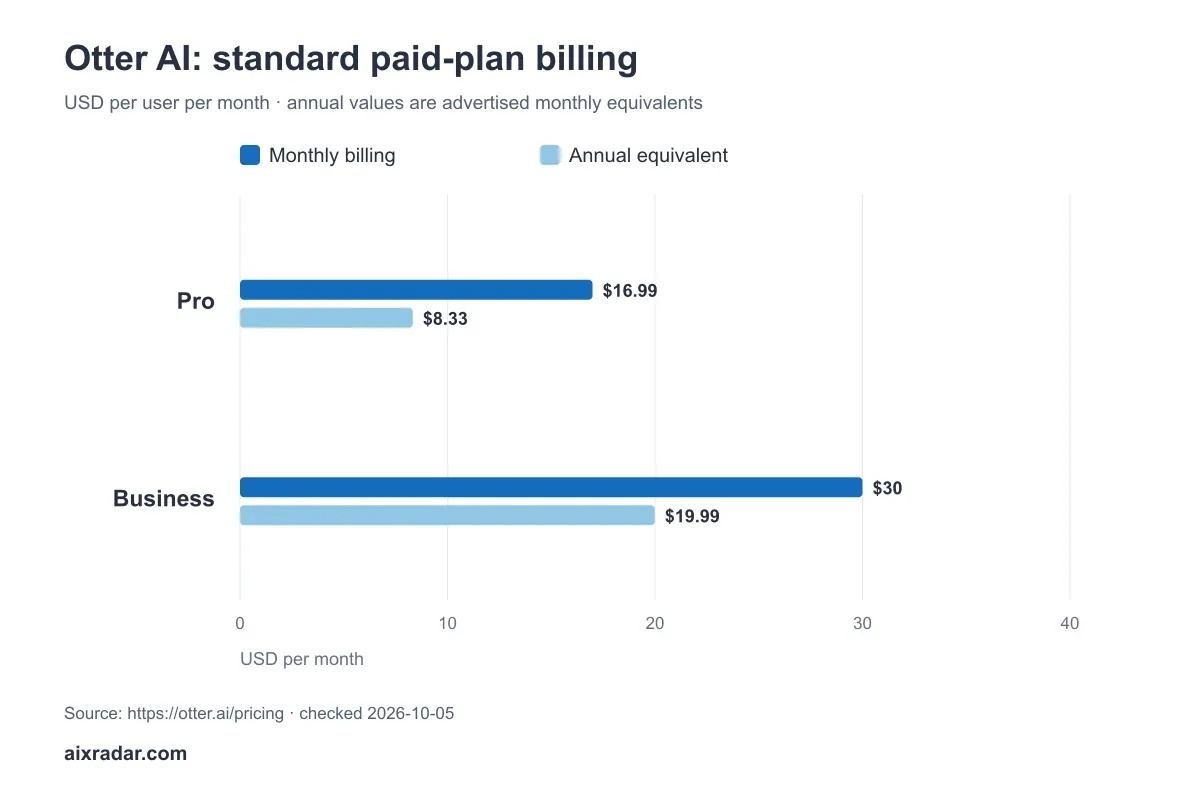

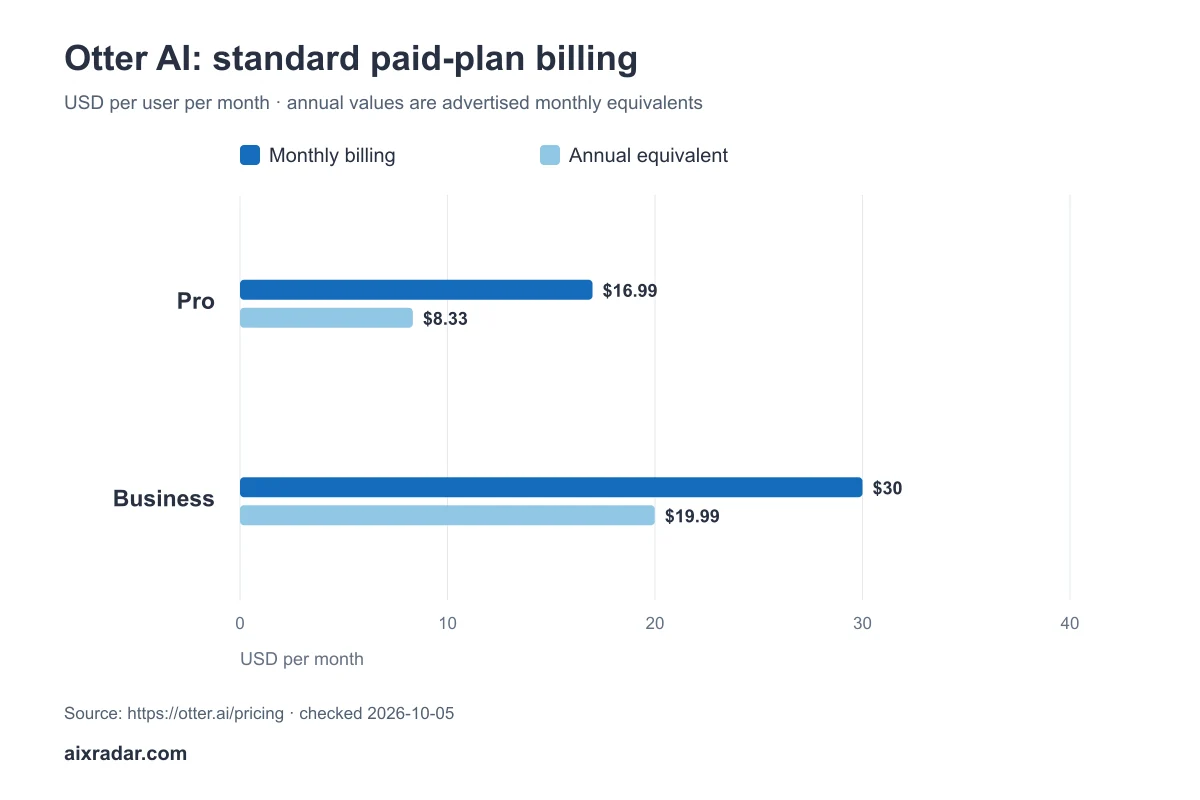
Otter AI’s free plan can suit occasional live meetings, but uploaded files have a separate limit that is easy to miss: Basic lists three lifetime imports. Its Pro plan is advertised at $16.99 per user monthly or $8.33 per month equivalent on annual billing. The right plan depends on whether you record meetings or import existing audio.
We checked the official pricing and comparison table on 5 October 2026. The examples below compare live-meeting and upload workflows separately; the method note explains the limits of this pricing analysis.
Otter AI pricing and the limits that matter
| Plan | Monthly rate per user | Annual monthly equivalent | Recording allowance | File imports |
|---|---|---|---|---|
| Basic | Free | Free | 300 minutes/month; 30 minutes/conversation | 3 lifetime imports |
| Pro | $16.99 | $8.33 | 1,200 minutes/month; 90 minutes/conversation | 10 imports/month |
| Business | $30 standard rate | $19.99 | Check current recording terms | Unlimited import count, with 6,000 imported minutes/month |
| Enterprise | Custom | Custom | Custom terms | Custom terms |
Otter official pricing and comparison table · checked 5 October 2026.
The public page also displays offers with eligibility restrictions. In particular, an India-card promotion should not be presented as a price available to every buyer. Check the order summary for your account, country and billing period. An annual monthly equivalent is not a monthly charge, and rounded figures do not establish the precise annual invoice.
Recording minutes and imported audio are different budgets
Do not evaluate a transcription plan using only its headline monthly minutes. The comparison distinguishes recording allowances from imported-file allowances. A reader with a folder of interviews can hit the file count while staying well below a minute limit.
Business advertises unlimited import count with a 6,000-minute monthly allowance for imported material. Unlimited files therefore does not mean unlimited audio duration. Check both dimensions when estimating a backlog.
Three workload examples
A few short uploaded interviews
Three ten-minute imports amount to thirty minutes. That looks small beside Basic’s 300-minute recording headline, but it uses all three advertised lifetime imports. Repeating the same workload next month is a different requirement; a lifetime count does not refresh monthly.
Regular live meetings
Twelve sixty-minute meetings total 720 minutes. That hypothetical schedule fits Pro’s 1,200-minute recording allowance and its ninety-minute per-conversation limit. It exceeds Basic’s monthly and per-conversation figures. This arithmetic does not establish whether the transcript is sufficiently accurate for the work.
A large batch of short files
Fifty fifteen-minute audio files total 750 minutes. Pro’s ten-import monthly count becomes a problem even though the duration is modest. Business’s advertised unlimited file count makes it a tier to examine, with the imported-minute allowance still needing a check. Confirm the workspace quote rather than assuming a larger tier is automatically the cheapest route.
Plan around the longest conversation, not just the monthly total
Imagine four two-hour workshops in a month. The total is 480 minutes, below Pro’s listed 1,200-minute recording allowance. Each workshop, however, exceeds the ninety-minute conversation limit in the table. A comfortable monthly balance does not make that individual recording eligible as one conversation.
Identify the longest session you need to capture before comparing prices. If you plan to split a session, check whether the workflow supports that and whether the resulting notes remain useful. Several separate transcripts can add review work when decisions and action items span the break.
Also separate an ongoing meeting schedule from a one-off backlog. Importing thirty old interviews this week is a different need from recording three meetings each week for a year. The first may be constrained by import count immediately; the second may be constrained by meeting length, minutes or team access. Put them on separate lines rather than averaging them into a single monthly number.
How to compare the total subscription cost
First count the paid users who need access. Two users at Pro’s standard $16.99 monthly rate would be $33.98 per month before tax, assuming both require paid seats. Do not quote a per-user rate as the whole team’s cost.
Next decide whether the workload is recurring. Annual billing is easier to evaluate after you understand the mix of live meetings and uploads. If you only have one backlog, compare the duration of your need with the annual commitment rather than focusing on the lowest displayed monthly equivalent.
Include review effort in the cost of usable meeting notes
For decision-making records, the useful output is an accurate set of notes you can share appropriately, not simply a completed transcript. Decide which parts need human confirmation: named people, product names, numbers, agreed deadlines and who owns each action. Plan that review before assuming automated notes remove the whole task.
As a planning example, twelve meetings requiring fifteen minutes of transcript and summary review each create three hours of review work. That time sits alongside the subscription even when every recording fits the plan. The fifteen-minute assumption is not an Otter test result; replace it with your own workflow once measured.
A practical review sequence is to compare disputed passages with the recording, correct speaker labels, confirm the decisions and then review the action list. Keep uncertain wording marked until someone can resolve it. If a summary is concise but assigns a task to the wrong person, the transcription allowance alone has not delivered a usable result.
Team access changes more than the invoice
List who records, who edits, who needs the full transcript and who needs only approved notes. Check the plan’s current sharing and administration options against those roles. Do not assume everyone viewing a shared output needs an identical paid seat, or that one subscription gives every colleague the same workspace access. Confirm the account’s entitlement before multiplying the per-user rate.
Before recording confidential meetings, review the organisation’s permissions and the provider’s current data controls. A pricing table cannot establish that a workspace is configured appropriately for its material. This guide does not report a security or privacy audit of Otter.
What pricing cannot tell you about Otter
Limits can narrow the choice, but they cannot establish accuracy for your accents, microphones, background noise or technical vocabulary. A useful later test would use representative audio and inspect speaker labels, named entities and corrections. Until then, descriptions of those features are vendor claims.
For important notes, plan time to compare the transcript with the recording. A minutes allowance that covers the schedule is only the first purchasing filter; editing time and consent requirements belong in the workflow decision too.
Which Otter plan should you start with?
Choose from the limiting requirement: conversation length, recording minutes, imported-file count, imported duration or team access. Basic is easiest to assess for occasional short meetings; Pro and Business merit comparison when a listed limit excludes your workload. Explore the AI audio tools category for related coverage.
Can the free plan handle a recurring interview workflow?
Basic’s three lifetime imports make it a poor allowance match for repeated uploaded interviews once that count is used. The distinction is lifetime versus monthly, not whether each file is short. For a live-meeting workflow, compare the separate conversation-length and recording-minute limits instead. Evaluate the feature you will actually use.
Evidence and scope: Prepared under Malik Hasnain’s AIX Radar byline from official plan information checked on 5 October 2026. We found no completed Otter accuracy test in the existing records, so none is implied. See how we distinguish researched guides from tested reviews and who runs AIX Radar.
Check Otter AI plans. Confirm the billing period, final amount and renewal terms before paying.