
GLM Coding Plan invite offer — extra 10% off for eligible new subscribers.
No typed GLM discount code needed — the discount is applied automatically when you sign up through the invite link below.

My original test used GLM-5.2 through Claude Code. The screenshots below document that earlier offer; current model access has changed. This update corrects the discount calculations and explains the newer credit allowances without presenting a new hands-on test.
Quick answer: Open this Z.ai invite link and check the offer for your account. If checkout applies a 30% annual reduction followed by a further 10%, you pay 0.70 × 0.90 = 0.63 of the original total: 37% off. Eligibility, available billing cycles and renewal pricing must be confirmed before payment.
How to Claim the 10% GLM Coding Plan Discount
The whole thing takes maybe two minutes. Here’s what happens when you click the invite link:
Step 1: Click the Invite Link
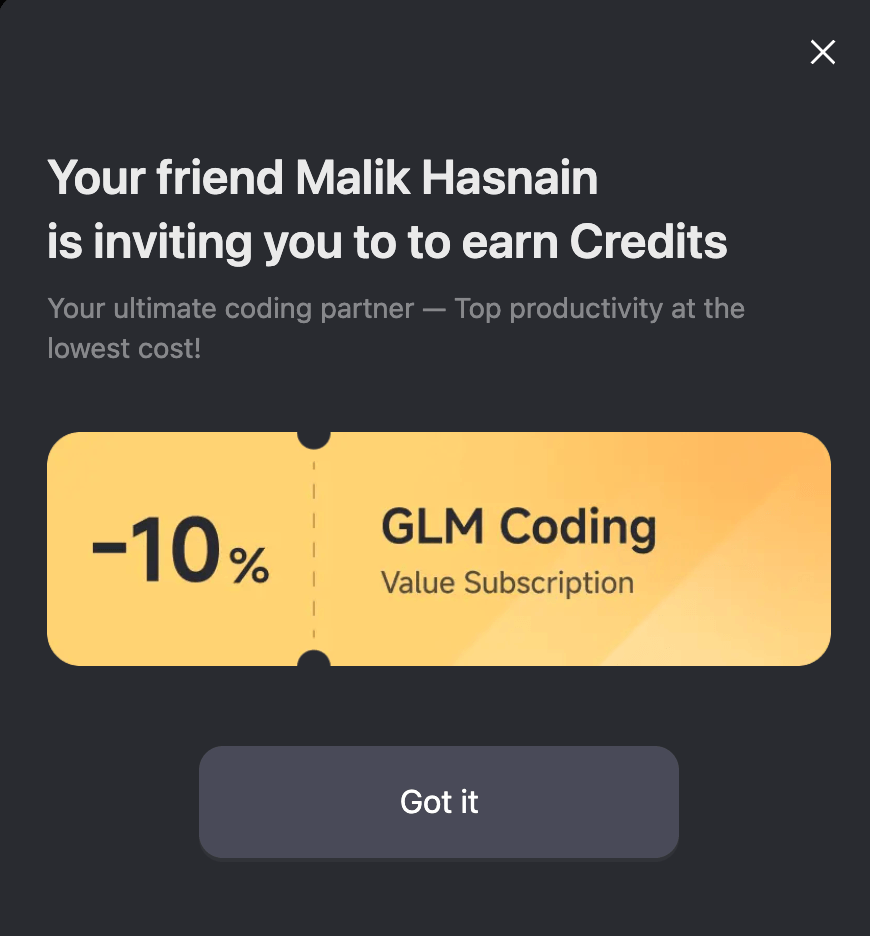
Go to Z.ai Coding Plan with 10% off. This is the referral link that activates the discount — you’ll see a popup confirming “MALIK Hasnain gave you extra 10% off” on the landing page. (Yes, that’s me — I use the plan myself, which is why I can vouch for the discount working.)
Step 2: See the Referral Popup
When you land on the page, a popup appears confirming the discount is active:
Step 3: Pick Your Plan
The original offer showed Lite, Pro and Max with the following reductions. Treat the screenshots as a record of that offer:
- -30% per Year — the annual billing discount (built into the displayed price)
- Friend Gift: 10% Off — your referral discount (applied at checkout)
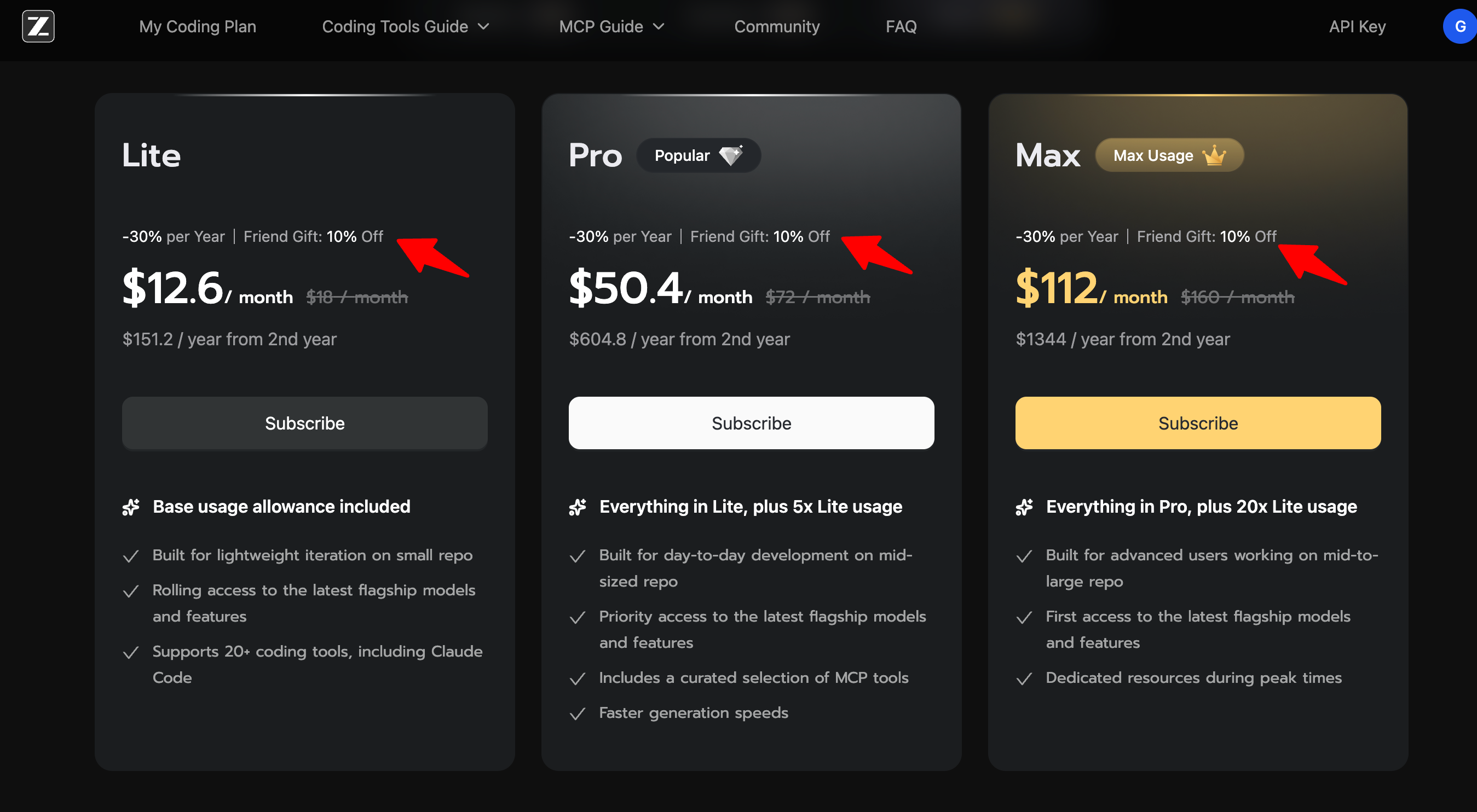
When a checkout applies discounts sequentially, the second discount reduces the already discounted amount. Do not add the two percentages together.
Quick rundown of the three tiers (same models, just different quota):
- Lite — for individual developers dipping their toes into AI coding
- Pro — a larger allowance for regular coding
- Max — power users and teams running heavy agentic workflows
Step 4: Choose Your Billing Cycle
Choose a billing cycle based on the upfront commitment. In the recorded annual example, 30% followed by 10% saves 37%; an annual equivalent is paid for a full year, not one month at a time.
Step 5: Confirm the Discount at Checkout
Before you pay, the order summary will show the invite discount already applied. You don’t need to type anything — it’s automatic.
Step 6: Complete Your Subscription
Confirm the first payment, renewal total and eligible tool before subscribing. Current model access is summarized below.
🎁 Get 10% Off the GLM Coding Plan Now →
GLM Coding Plan Pricing With the Extra 10% Off
For quotas and billing options beyond the invitation offer, see our GLM Coding Plan pricing guide.
The following are worked examples using the prices in the original screenshots, not a live checkout quote. They assume the recorded base prices and both reductions still apply. Taxes and renewal prices are excluded.
How the stacking works:
- Annual billing: 30% off the standard monthly rate (shown in the pricing table)
- Invite link: extra 10% off on top (applied at checkout)
- Combined: 37% off what you’d pay month-to-month with no discounts
Recorded Base Prices Used in These Examples
The original annual offer reduced these monthly base rates by 30%:
| Plan | Standard Monthly | Annual (30% off) | Displayed Price |
|---|---|---|---|
| Lite | $18/mo | $12.60/mo | |
| Pro | $72/mo | $50.40/mo | |
| Max | $160/mo | $112/mo |
The 10% invite discount is applied at checkout, on top of these displayed prices.
Annual Example: 30% Then 10% = 37% Off
| Plan | Standard Monthly | Annual (30% off) | With Invite (37% off) | Monthly Equivalent | Annual Total |
|---|---|---|---|---|---|
| Lite | $18/mo | $12.60/mo | $11.34/mo | $11.34 | $136.08/yr |
| Pro | $72/mo | $50.40/mo | $45.36/mo | $45.36 | $544.32/yr |
| Max | $160/mo | $112/mo | $100.80/mo | $100.80 | $1,209.60/yr |
In this example, Lite costs $136.08 upfront for a year, equivalent to $11.34/month. Pro is $544.32/year and Max is $1,209.60/year. Compare the total commitment with how often you actually use the tool.
Monthly Billing + 10% Invite Discount
For comparison, these examples apply a single 10% reduction to the recorded monthly prices:
| Plan | Standard Monthly | With Invite (10% off) | You Save |
|---|---|---|---|
| Lite | $18/mo | $16.20/mo | $1.80/mo |
| Pro | $72/mo | $64.80/mo | $7.20/mo |
| Max | $160/mo | $144/mo | $16/mo |
Quarterly Billing + Invite Discount
This example starts with a quarterly price already reduced by 10%, then applies a further 10%. The final saving against three undiscounted months is 19%:
| Plan | Quarterly After First 10% | After Further 10% Invite | You Save |
|---|---|---|---|
| Lite | ~$48.60/qtr | ~$43.74/qtr | ~$4.86/qtr |
| Pro | ~$194.40/qtr | ~$174.96/qtr | ~$19.44/qtr |
| Max | ~$432/qtr | ~$388.80/qtr | ~$43.20/qtr |
What Is the GLM Coding Plan, Exactly?
The GLM Coding Plan is a subscription for supported coding workflows. Z.ai’s current documentation lists GLM-5.3 and GLM-5.3-Flash for all tiers. Requests for GLM-5.2/5.1 route to GLM-5.3, while GLM-4.7 requests route to GLM-5.3-Flash.
The plan uses an OpenAI-compatible endpoint, which is why it works with so many tools out of the box:
- Claude Code — Anthropic’s CLI coding agent (my primary use case)
- Cursor — AI-powered code editor
- Cline — autonomous coding agent for VS Code
- OpenClaw — open-source AI assistant
- Roo Code — VS Code extension
- 20+ other IDE integrations
Usage is now measured in credits, not a fixed number of prompts. Token consumption and model choice affect how far a credit allowance goes.
Current Credit Allowances
| Tier | Credits / 5 Hours | Credits / Week | MCP Usage |
|---|---|---|---|
| Lite | 2,000 | 10,000 | Deducted in credits |
| Pro | 12,000 | 60,000 | Deducted in credits |
| Max | 28,000 | 140,000 | Deducted in credits |
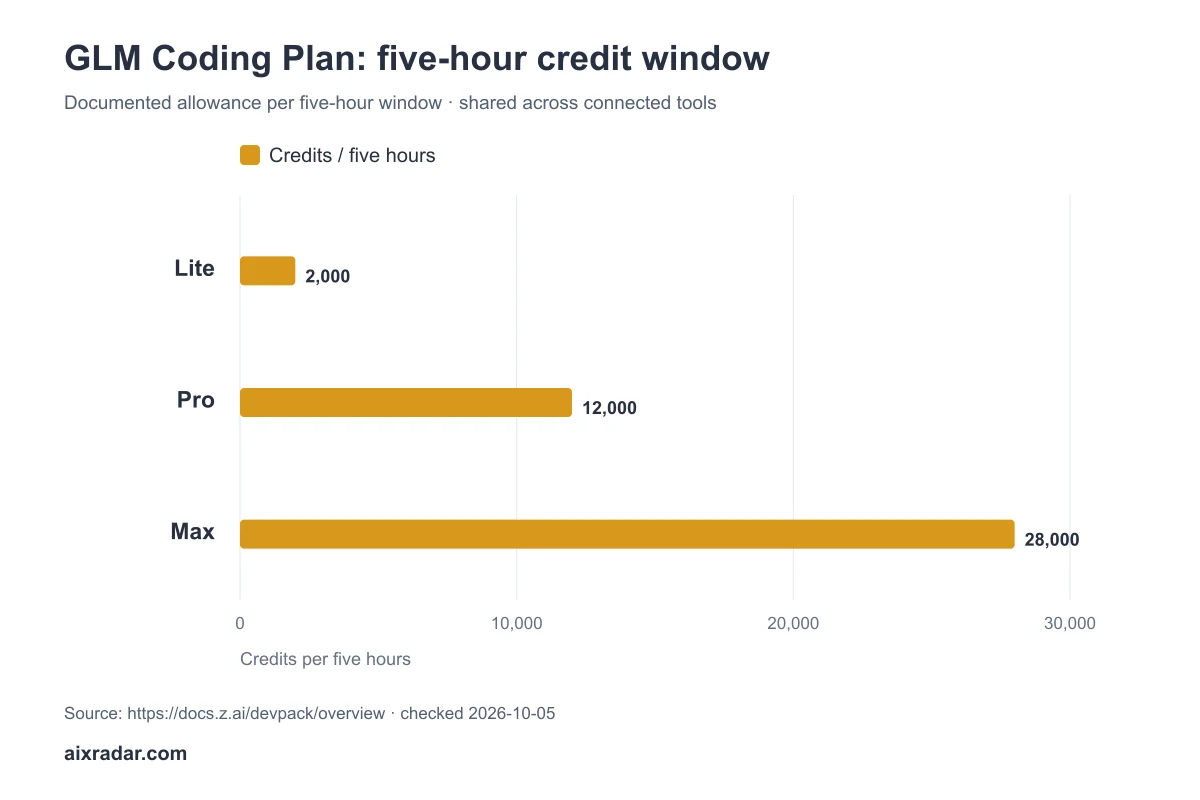
The old prompt-count estimates and fixed MCP call counts no longer describe the current plan. Use the credit table above and your account’s usage meter when estimating capacity.
The September promotion mentioned in the original article is historical. Check the current campaign terms before relying on any temporary usage multiplier.
Which Plan Should You Pick?
Lite — $11.34/mo with annual + invite
Consider Lite for occasional coding sessions. Start with the smallest commitment that lets you assess output quality and credit use on your own projects.
- Check the credit allowance above
- Tool calls consume credits
- Good fit: solo devs, weekend projects, trying the supported models
Pro — $45.36/mo with annual + invite
Consider Pro when regular agent runs exhaust the smaller allowance. A higher limit is useful only if the model produces work you can use with reasonable review effort.
- Track credit use during a typical workday
- Compare the upfront cost with actual usage
- Good fit: professional developers, daily AI-assisted coding, agentic workflows
Max — $100.80/mo with annual + invite
Consider Max for sustained workloads after measuring your consumption. Check account-sharing and team-plan terms separately before buying for multiple people.
- Measure peak workload before upgrading
- Leave room for long agent runs
- Check current scheduling and capacity terms
- Good fit: teams, heavy agent workflows, anyone running multiple coding sessions daily
Pros and Cons
What’s Good
- Clear cost examples — compare the full billing-cycle total before subscribing
- Two current model options — see the model-access update above
- 20+ tool integrations — works with the tools you’re already using
- Predictable spend — fixed monthly cost, no surprise token bills
- Usage visibility — monitor consumption to choose an appropriate tier
- Referral stacks — the 10% invite discount combines with annual billing for 37% total
What’s Not So Good
- Coding tools only — can’t use it for general chat, research, or API workloads (the plan detects and blocks SDK-based access)
- Variable consumption — prompt length and model choice affect usage
- Upfront commitment — an annual equivalent does not mean monthly billing
- Hard quota cap — hit your limit and you wait. No pay-as-you-go overage option.
Other Ways to Save on the GLM Coding Plan
🆓 Free Trial?
A discounted annual plan is still a paid annual commitment. Z.ai’s subscription FAQ says purchases are non-refundable and cancellation should happen at least 24 hours before renewal.
📅 Annual Billing (30% Off)
If your current offer includes both reductions, use the worked examples above. Confirm that the invitation benefit applies to your first purchase; do not assume it continues at renewal.
🔄 Referral Program (Get Your Own Link)
The referral programme has eligibility conditions: the friend must be a new paying subscriber and complete the first purchase within 72 hours through the invitation. Consult the programme terms in your account for reward details.
💳 Payment Methods
Z.ai accepts major credit cards and debit cards through Stripe. No extra discounts for specific payment methods. Credits are consumed first, then cash balance, then your linked payment method.
Seasonal Deals Calendar
🖤 Black Friday / Cyber Monday (November)
A future Black Friday discount is not confirmed here. Compare an announced offer with your checkout total when it becomes available.
🎮 Programmer’s Day (October)
Past event promotions do not establish the terms of a future offer. Check dates, eligibility and the final billed amount.
⚡ Limited-Time Promotions
The earlier September campaign has ended. Temporary usage offers can change independently of subscription pricing.
Check the current offer before paying. This page distinguishes recorded screenshots from updated documentation and calculated examples.
How do I get the 10% discount on the GLM Coding Plan?
Click this invite link and the 10% discount is applied automatically at checkout. No promo code needed — the discount shows up in your order summary before you pay.
Does the invite discount work on all GLM Coding Plan tiers?
Yes. The 10% off applies to all three tiers — Lite, Pro, and Max — and works on monthly, quarterly, and annual billing cycles.
Can I combine the invite discount with annual billing?
If checkout applies 30% off followed by 10% off, the combined saving is 37%. Verify availability and eligibility; the percentages cannot simply be added.
Is there a GLM Coding Plan free trial?
Do not treat an annual subscription as a risk-free trial. Review the billing and cancellation terms before buying; the examples above show a full-year commitment.
What coding tools work with the GLM Coding Plan?
The plan uses an OpenAI-compatible endpoint that works with 20+ coding assistants: Claude Code, Cursor, Cline, Roo Code, OpenClaw, and most popular IDE integrations. It’s designed for coding use only — not general chat or research.
Does the GLM Coding Plan quota refresh?
The five-hour credit allowance refreshes dynamically; the weekly allowance resets on its seven-day cycle. Watch the usage meter for your next reset.
What happens if I hit my quota limit?
The plan stops accepting prompts — no pay-as-you-go overage. You wait until the 5-hour window or weekly cap resets. The system won’t deduct from your account balance. If you keep hitting limits, upgrading to a higher tier is the move.
How does the GLM Coding Plan compare to Claude Code or GitHub Copilot?
Compare tools on your own coding tasks, supported integrations and total spend. A lower subscription price alone does not establish better code quality or value.
Do You Need a GLM Promo Code or an Invite Link?
The GLM discount described here uses our existing invite link, so there is no separate coupon to type. The referral identifies the offer when you sign up. Z.ai’s official referral FAQ says a successful invitation requires a new paying subscriber and a first subscription payment within 72 hours. A GLM promo code found elsewhere is a different offer, not a replacement for this invitation.
Ready to Get Started?
Use the invitation below to inspect your eligible offer. For broader API workflows, compare our Synthetic.new subscription and invite-credit guide.
No promo code. No coupon field to find. Click the link, pick a plan, and the discount is already there.
👉 Claim Your 10% GLM Coding Plan Discount →
Documentation and calculations reviewed on 4 October 2026. Screenshots and hands-on experience are from the original June article. Checkout eligibility was not retested in this update.
This page contains affiliate links. If you subscribe through them, we may earn a commission at no extra cost to you. See our affiliate disclosure.