
Pictory pricing starts at $29 a month on monthly billing. Its annual plans show lower monthly equivalents, but the more important comparison is what you are buying: script-video minutes and AI generation credits are separate allowances. A long stock-footage video and a short newly generated scene do not use the same budget.
This guide combines public plans checked on 5 October 2026 with relevant observations from our earlier recorded workflow. It helps you compare the allowance that matters to your production schedule. For an evaluation of the editor and output, read our Pictory AI review.
Pictory monthly and annual pricing
| Plan | Monthly billing | Annual displayed rate | Script-video allowance | AI credits |
|---|---|---|---|---|
| Starter | $29/month | $25/month equivalent | 200 minutes/month; 2,400/year on annual | 100/month; 1,200/year on annual |
| Professional | $59/month | $35/month equivalent, current offer | 600 minutes/month; 7,200/year on annual | 500/month; 12,000/year on annual |
| Team | $199/month | $119/month equivalent | 1,800 minutes/month; 21,600/year on annual | 2,400/month; 28,800/year on annual |
| Enterprise | Custom | Custom | Agreed with sales | Agreed with sales |
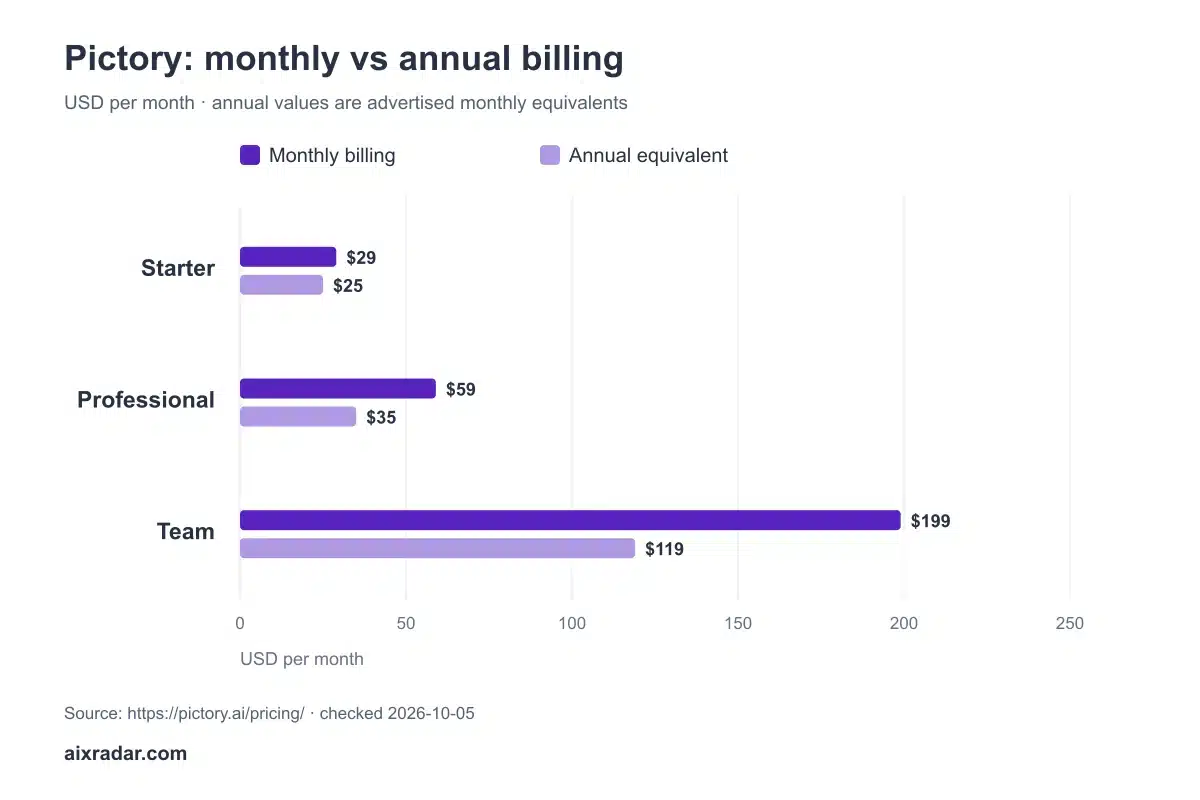
Pictory pricing and plan comparison · checked 5 October 2026.
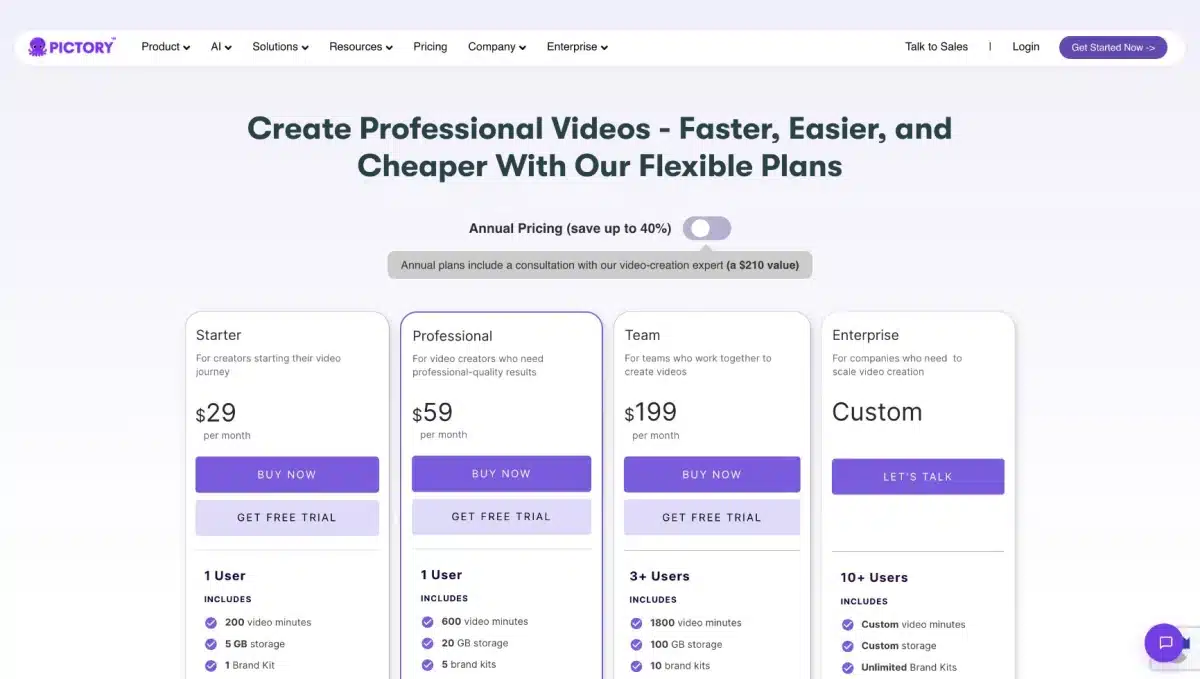
The Professional annual offer has a different credit allowance from twelve months of the current monthly plan. Compare the actual allowance shown for your chosen billing period, rather than assuming annual billing changes only the price. The displayed annual rate may also be rounded: check the full annual invoice, tax and renewal amount at checkout.
What our existing Pictory test tells you about the budget
Malik’s recorded test on 14 May 2026 followed a complete script-to-video workflow on a MacBook M1. He opened a paid account, created a brand kit, pasted an AI-business explainer script and left the initial settings at their defaults. The first storyboard preview was ready after 55 seconds. He then chose the ElevenLabs Abby voice, adjusted the caption colour and added an avatar before exporting.
The avatar-generation screen quoted 30 AI credits and an estimated five-to-ten-minute processing time. The notes record a ten-minute final export. That distinction matters: seeing a quick storyboard does not mean an avatar export will be ready equally quickly. It also shows why an ordinary video-minute allowance is not enough to budget a workflow that adds generated presenters.
These are observations from one older project, not current speed guarantees or a universal 30-credit tariff. The original output and workflow are linked in our Pictory hands-on review. Use them to understand the steps, then read the current generation quote for your own duration and settings.
One practical lesson survives pricing changes: configure the brand kit before producing a batch. Malik’s notes show separate setup screens for the initial name, colours and fonts, followed by more detailed customisation. Establishing those choices once can reduce repeated caption and branding corrections. It does not remove the need to check each scene for relevance.
What does the Pictory trial let you check?
The public comparison lists a 14-day trial, 15 video minutes, a five-minute limit per trial video and 50 AI credits. Paid script/URL-to-video projects have a listed 30-minute maximum. These are the vendor’s advertised limits, not a promise that every type of generation uses the same allowance.
Use the trial to answer a specific question before choosing annual billing. Bring one representative script, add the kind of voiceover you actually use, and inspect the exported file. A short draft can expose a mismatch in stock footage, caption placement or narration before a larger subscription commitment. Record the allowance before and after the task so you can distinguish video minutes from generated assets.
A practical video-minute budget
Suppose you plan twelve five-minute explainer videos per month. The finished duration is 60 minutes. If your workflow uses a second complete version of every video, a conservative planning allowance is 120 minutes. Both numbers are illustrative; actual charging depends on the action Pictory counts.
At the $29 monthly Starter rate, dividing the subscription by twelve finished videos gives $2.42 per video before your time, taxes and any other costs. Producing only six usable videos makes the same allocation $4.83. This is subscription allocation, not Pictory’s price for generating a video, and it does not establish output quality.
Next budget the generative scenes separately. A workflow with many regenerated clips may hit AI credits while video minutes remain. Estimate both allowances and leave room for rejected scenes; do not treat an advertised maximum as your expected production yield.
Which Pictory plan should you consider?
Start with Starter if its allowances cover the work you can realistically finish. Professional merits comparison when you need more minutes or generation capacity; check the annual promotional allowance carefully. Team is a different purchasing decision because collaboration and user count matter alongside quotas. Buying extra capacity makes little sense if scripting or editing time is your real bottleneck.
Before choosing a higher plan, write down your expected finished videos, average duration, generated-scene count and number of collaborators. Then compare the binding limit: whichever allowance you expect to exhaust first. This gives you a more useful decision than choosing the plan labelled most popular.
Compare voices, brand kits and upfront commitment
The current official plan cards list one brand kit on Starter, five on Professional and ten on Team. Starter and Professional are presented for one user; Team lists three or more. A freelancer making content for several clients should compare brand-kit capacity before assuming a larger minutes balance is the only reason to upgrade.
Voice allowances deserve a separate check too. The monthly cards list 60 minutes of ElevenLabs voices for Starter and 120 for Professional, alongside larger script-video allowances. If every explainer uses a premium voice, that voice allowance may become your constraint before ordinary video minutes. An uploaded narration workflow has different requirements.
Using the displayed annual equivalents, Starter represents $300 for twelve months, Professional $420 and Team $1,428 before tax or a separately accepted coupon. These are calculations from the rates in the table; the final invoice controls. Professional’s $35 rate is a displayed offer, so record both the first annual charge and the renewal terms rather than assuming the offer lasts indefinitely.
A useful stopping rule for plan selection
Choose the least expensive eligible plan after checking four things: your required features, the allowance you will exhaust first, collaborator access and the cash commitment. If Starter covers sixty minutes of finished explainers but lacks a feature you need, its spare minutes do not make it suitable. If Professional covers the work but you publish only occasionally, an annual saving can still cost more than a short monthly subscription.
Can SAVE20 be combined with annual pricing?
Our Pictory SAVE20 coupon guide explains the existing partner code. Do not assume that it stacks with the Professional promotion or applies to every renewal. Check the actual discount line and terms before payment.
Is Pictory unlimited?
The published plans have allowances. A higher plan increases capacity, but minutes and AI credits still need separate tracking. For other video workflows, browse the AI video tools category.
Evidence and author: This guide combines Malik Hasnain’s May workflow notes with the official pricing check dated 5 October 2026. The earlier test is described with its original scope; billing examples are calculations. Our testing approach explains how experience and public-source research are distinguished.
Check Pictory plans. Confirm the billing period, final amount and renewal terms before paying.