

The SEOWriting WordPress integration can move generated articles and associated fields into your site. The valuable control is deciding what happens next: save an editable draft, review its facts and layout, and publish only after the content meets your editorial standard.
This guide is for bloggers and small teams who want a repeatable handover from generation to WordPress. We checked the official integration guide and plugin listing on 16 October 2026. We have not connected a new account or tested a fresh autopublishing run for this article.
What the official integration supports
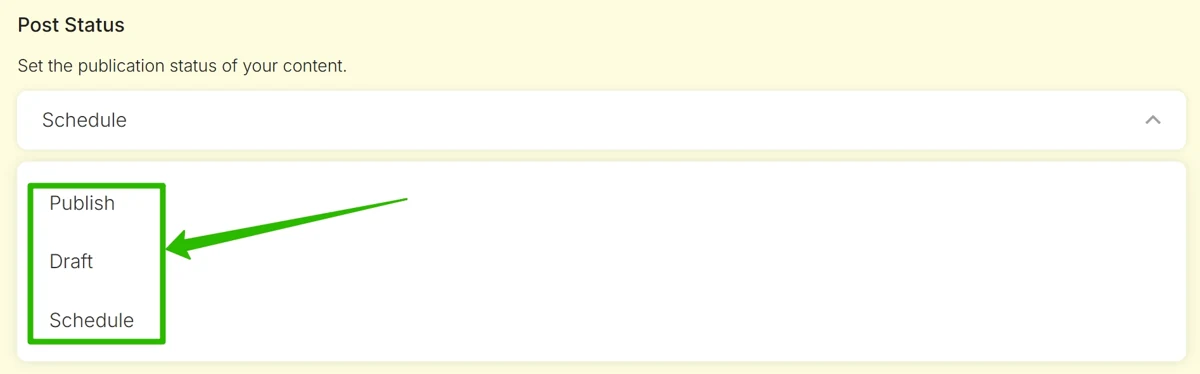
SEOWriting’s WordPress integration guide documents transferring titles, article text, images, meta titles and meta descriptions. It offers Publish, Draft and Schedule states, plus author, category and featured-image choices. Rank Math is among the SEO plugins named for metadata support.
These are documented capabilities, not proof that every site configuration will behave identically. A site’s theme, other plugins and publishing workflow can affect the final result. Use a small initial transfer to check the actual saved output before trusting a larger batch.
For the existing owner-confirmed MALIK offer, see our SEOWriting coupon and eligibility guide. The offer does not remove the need to confirm the features and usage allowance required by your workflow.
Connect deliberately and check the current requirements
The official setup uses the SEOWriting WordPress plugin, activation and its Connect control while signed in to the corresponding SEOWriting account. The website should then appear in the account’s integrations list. The guide also documents disconnecting from either the plugin settings or the service’s integration controls.
Use the current WordPress.org plugin listing to check the publisher, requirements and changelog. The older integration article includes a compatibility table; do not treat its historical minimum versions as a reason to keep an outdated site runtime.
Before connecting, identify the person responsible for reviewing incoming posts and the website that should receive them. For agencies managing several domains, record the destination alongside the content brief. A correctly formatted article sent to the wrong site is still a publishing failure.
Choose Draft before generating the article
| Setting | Recommended first-run choice | Why it matters |
|---|---|---|
| Destination | The intended website and post type | Prevents content entering the wrong site or page workflow |
| Status | Draft | Creates a review point before public release |
| Author | The responsible editor or writer | Keeps accountability clear |
| Category | An existing relevant topic | Avoids unnecessary archive duplication |
| Featured image | Enable only when the chosen image is suitable | Separates a cover from incidental article illustrations |
| SEO fields | Transfer, then inspect in WordPress | Checks the saved values rather than the generator preview |
Keep the first transfer small enough to inspect completely. Open the WordPress record and confirm its actual status. A completion message from an external service does not replace that check, especially when a tool uses “publish” as a broad label for sending content.
For scheduled work, verify the intended date, time and site time zone. Resolve a scheduling mismatch before sending a batch. An article becoming public at the wrong time is an operational issue even when its text is ready.
Review the article’s claims before its SEO score
Build the draft from a clear brief: the reader, the decision being answered, the sources and the information that still needs confirmation. Once it arrives in WordPress, inspect product limits, prices, dates and quotations. Trace each consequential claim to the source rather than accepting a citation because it looks plausible.
Separate documentation from experience. A feature described by the vendor can be reported as a documented feature. It should not become “we tested this” unless there is a real test record. Customer reviews can be attributed as customer experiences; rewriting them in first person does not make them your own testing notes.
Google’s people-first content guidance emphasizes usefulness, trust and meaningful value. A plugin score or a preferred word count is not a ranking guarantee. Spend editing time on the question the reader came to resolve.
Check featured images and article media separately
A featured image must work as a small card as well as a large cover. Use a relevant visual, readable short text and an accurate brand identity. Avoid a generated picture that resembles a real product screenshot when it is only an illustration.
For article screenshots, retain the original capture and the context it proves. A pricing screenshot should have a date and billing context; a workflow screenshot should identify the relevant step. Do not reuse an old account screen as evidence of a new feature or a new test.
Use descriptive filenames and factual alternative text. Compress images while keeping text readable, and retain suitable dimensions for the theme. Check that the selected featured image is actually attached to the post rather than merely inserted into the body.
Inspect Rank Math fields and internal links
After a draft arrives, inspect the saved SEO title and description. Write a unique description explaining the page’s value. Keep the title, opening paragraph and main heading aligned with the reader’s question without repeating the same phrase in every section.
Check the slug before publication and keep already established URLs stable. Review internal links one by one: does the destination exist, does it answer the linked question, and does the anchor accurately describe it? Avoid inserting links to planned pages that are still unpublished.
For a workflow that later turns a finished article into video, our Pictory review covers the separate script-to-video stage. That connection belongs in a discussion of repurposing, not in every paragraph about writing.
Also inspect FAQ markup if the integration and SEO plugin can both create it. One visible set of answers should not be accompanied by conflicting duplicate structured data. Structured data describes the page; it is not a substitute for useful answers.
Handle revisions without losing useful material
Before replacing an existing post, preserve a recovery copy and identify the material that must remain: original screenshots, tables, affiliate links, verified codes and editorial additions. Compare the incoming version with the current post rather than assuming another transfer is a harmless refresh.
The plugin listing includes changes relating to updating posts and handling images during republication. That makes the exact update workflow worth checking on a disposable draft before using it on a valuable live article. This is a proposed safety check, not a test we performed here.
When the process is reliable, scale the queue gradually. Assign an editor, retain source notes and use a final checklist covering content, media, links and metadata. The time saved in transfer is most useful when it is reinvested in the parts automation cannot verify for you.
Frequently asked questions
Can SEOWriting save to WordPress as a draft?
Yes. The official integration guide documents Draft alongside Publish and Schedule. Confirm the saved WordPress status after the transfer.
Does SEOWriting support Rank Math titles and descriptions?
Rank Math is named in the official integration documentation. Inspect the actual saved fields on your site rather than assuming a successful connection proves every field mapped correctly.
Does a high SEO score mean the article will rank?
No. A score is a tool’s assessment, not evidence of Google rankings. Source accuracy, useful coverage and a clear answer still require editorial review.
Can I choose the WordPress author and category?
The integration guide documents author and category controls. Select them deliberately and inspect the saved WordPress draft before publication, especially on a site with multiple writers.