Look, AI detection is having a moment. Everyone’s suddenly worried about whether that LinkedIn headshot is real, whether that email from your “boss” was written by a human, whether that viral video is actually footage of something that happened. TruthScan jumps into this chaos promising to be the one-stop shop — text, images, voice, video, emails, receipts — every possible thing you might want to verify. Six detectors in one dashboard.
I spent an afternoon throwing my own content at every TruthScan tool. Used ChatGPT text, AI-generated images, real photos from my phone. Here’s everything I found — what impressed me, what made me raise an eyebrow, and whether this thing is actually worth the subscription.
Quick Takeaways Before We Get Into the Weeds
- AI Detector vs AI Humanizer Tools
- Best AI Detector Tools
- Best at: Image and deepfake detection. 99% accuracy on AI images, 3% false positive on real photos. It’s genuinely good at this.
- Decent at: Text detection. Caught AI text but the quick scan vs deep scan gap is real (51% vs 72% on the same text).
- Pricing: Free to start (20,000 credits, no card). Paid plans from $49/month. Enterprise-oriented — individual users, you might want to look at cheaper options.
- The elephant in the room: TruthScan is owned by the same guy who runs Undetectable AI — the tool people use to bypass AI detection. Make of that what you will.
- Bottom line: 4.2/5 for images and deepfakes. 3/5 for text. If you need multimodal detection, it’s the strongest option. If you only need text, there are better tools.
What Even Is TruthScan?
TruthScan is an AI detection platform built from the ground up for organizations — not hobbyists. Christian Perry founded it in 2024 (yes, the same Christian Perry behind Undetectable AI — more on that later). Based out of Sheridan, Wyoming. The platform scans content across text, images, audio, video, email, and document formats, then tells you how likely it is that AI was involved.
It’s not a freebie side project. The platform protects over 250 million users through direct customers and embedded tech in tools like ZeroGPT and DeepAI. It’s got SOC 2 Type II and ISO 27001 certifications. GDPR compliant. This is serious infrastructure — the kind of thing banks and insurance companies plug into their workflows, not something a college kid built over the weekend.
The pitch is simple: instead of juggling five different detectors for five different content types, you use one platform that does all of them. And based on my testing — at least for images — the unified approach actually works.
Getting Started: Signup and Dashboard
Signing up is straightforward. Go to truthscan.com, hit the sign-in button in the header, enter your email, and they send you a one-time code. No password to remember. The code lands in your inbox almost instantly — I didn’t wait more than 10 seconds.
Once you’re in, the dashboard is clean. Almost too clean? Like, there’s nothing confusing about it, but you might sit there for a second wondering which button to press first. Turns out — any of them. The main four detector tools are right there in the center. You also get a clear view of your credit balance so you know exactly what you have to work with.

Scrolling down, you’ll see all four detection modules laid out — text, image, audio, and video — each with its own card and quick-start button. No hunting through menus. Everything is where you’d expect it to be.

The Detection Tools: What They Actually Do
AI Text Detector — Quick Analysis
This was the first thing I tested. I fed ChatGPT a simple prompt — “Write 250 words explaining what OpenClaw is” — and got back a perfectly readable, slightly dry summary about the self-hosted AI assistant. Standard ChatGPT output. Nothing fancy, no humanizer tricks applied.
Here’s the exact text I used:
OpenClaw is an open-source personal AI assistant designed to do real tasks instead of only answering questions. Unlike a normal chatbot, OpenClaw can connect with messaging apps, files, calendars, email, browsers, and other tools so it can act like a digital worker. Users can send instructions through apps such as WhatsApp, Telegram, Discord, or similar chat platforms, and OpenClaw can respond, organize information, automate workflows, and complete practical actions.

The main idea behind OpenClaw is autonomy. It can use large language models, such as GPT or Claude-style models, to understand instructions and then perform steps using built-in "skills." These skills may include writing emails, checking schedules, browsing websites, managing files, running commands, or helping with business tasks. Because it is self-hosted, users can run it on their own computer or server, giving them more control over their data compared with fully cloud-based assistants.

OpenClaw became popular because it shows what the next generation of AI agents may look like: assistants that do not just talk, but actually take action. It can be useful for freelancers, small businesses, developers, and productivity-focused users who want to automate repetitive digital work.

However, OpenClaw also has risks. Since it may access private files, emails, calendars, and accounts, users must be careful with permissions, security settings, and third-party skills. If configured badly, it could expose sensitive data or perform unwanted actions. Overall, OpenClaw is a powerful example of agentic AI, but it is best suited for users who understand both automation and digital security.
TruthScan offers two analysis modes: Quick Analysis and Deep Analysis. I started with the quick scan because that’s what the interface nudges you toward — it’s the default button, and psychologically you just want the fast result.
Quick Analysis took about 5 seconds for 250 words. Result: 51% AI.
That’s… not great. A coin flip on content I know for a fact was entirely AI-generated. If 51% is the best it can do on pure ChatGPT output, what happens when the text is actually ambiguous? The quick analysis also gives you a simple breakdown — it highlights some AI-leaning phrases and gives a general score, but the explanation is thin. You get a number and a gut feeling of “I guess it’s AI?” Not super helpful for making actual decisions.

AI Text Detector — Deep Analysis
Disappointed with the quick scan, I tried the Deep Analysis next. Same text. This one took longer — 12 seconds — but the output was in a completely different league.
Result: 72% AI-generated. Much closer to reality. The deep scan also broke down the analysis into actual useful categories: key writing patterns (repetitive sentence structure, consistent paragraph length — classic ChatGPT tells), linguistic patterns (word choice, transitional phrasing), and structural patterns. It even gave me recommendations on how to lower the AI score — essentially telling me how to make AI text look more human.
This is where the Undetectable AI connection gets weird. The detector owned by the Undetectable AI CEO literally tells you “here’s how to beat me.” Not subtle.

What I took away from the text tests: Never rely on Quick Analysis. The gap between 51% and 72% on the same content is massive — fast scans just aren’t trustworthy. Deep Analysis, on the other hand, delivered reasonable results in my test. Other reviewers have had a rockier ride though. Gold Penguin found 94% accuracy across their test set, which is solid. But TwainGPT reported 62% of human-written text getting flagged as AI — a false positive rate that makes it pretty useless for academic grading. Your mileage might vary depending on what you’re scanning. For my ChatGPT test, Deep Analysis passed. But the inconsistency across different reviewers’ experiences is something you should know about before relying on it for anything high-stakes.
AI Image Detector — Testing an AI-Generated Portrait
After the text test left me feeling kind of meh, I went into the image detector with low expectations. I was wrong to.
First test: I generated a corporate-style portrait using ChatGPT Image 2.0 — the kind of polished headshot you’d see on a company “About Us” page. Clean lighting, neutral background, professional attire. The kind of image that would fool most people scrolling through LinkedIn. Uploaded it to TruthScan.
Result: 99% AI-generated. It nailed it. The analysis explained exactly why — unnatural skin texture consistency, mathematically perfect lighting distribution, absence of real-camera sensor noise patterns. The breakdown gave me confidence that this wasn’t just a lucky guess. It knew why the image was synthetic.

AI Image Detector — Verifying a Real Photo
Now the real test. I uploaded a selfie taken on an iPhone 17 Pro Max. No filters, no edits, just raw camera output in natural lighting.
Result: 3% AI probability. Which is essentially saying “97% confident this is a real photograph.” TruthScan correctly identified natural depth-of-field blur (the kind that happens with actual lenses, not algorithmic blur), sensor noise patterns consistent with a physical CMOS sensor, and lighting falloff that follows real-world physics rather than a rendered approximation.
Both results came back in under a second. That’s the image detector in a nutshell — fast, accurate, and the explanations actually tell you something useful rather than just vomiting a percentage at you.

This tracks with what independent testers are finding. Unite.ai called TruthScan “the most accurate deepfake detector I’ve tried” with 96-99% accuracy on images and video. AI Detect Arena tested 934 images across 12 AI generators and found 94.8% overall — 100% on FLUX 2 Flex images specifically. Not marketing fluff. Independently verified numbers.
AI Voice Detector and Video Analyzer
I also ran quick tests on the audio and video tools. They delivered the same level of accuracy as the image detector — correctly distinguishing AI-generated voice from real speech, and catching deepfake video clips. The interface is consistent across all four tools, which means once you learn one, you know them all.
Fair warning on video: it chews through 50,000 credits per minute. If you’re scanning video regularly, you’ll want at least the Gold plan (about 340 minutes of video analysis per month). The audio detector is much lighter at 1,500 credits per minute.
There’s also an email scam detector (catches AI-generated phishing — integrates with SIEM tools) and a document analyzer for spotting manipulated receipts, fake bank statements, and doctored IDs. I didn’t test these extensively but they round out the “one platform for everything” positioning TruthScan is going for.
Oh — and TruthScan also powers the detection engine inside Undetectable AI’s text humanizer. If you use Undetectable AI to humanize text and check whether it passes detection, the verification step in that tool is literally running TruthScan under the hood. Small world.
TruthScan Pricing: What You’ll Actually Pay
TruthScan uses a credit system. Every scan consumes credits, and your monthly plan determines how many credits you get.
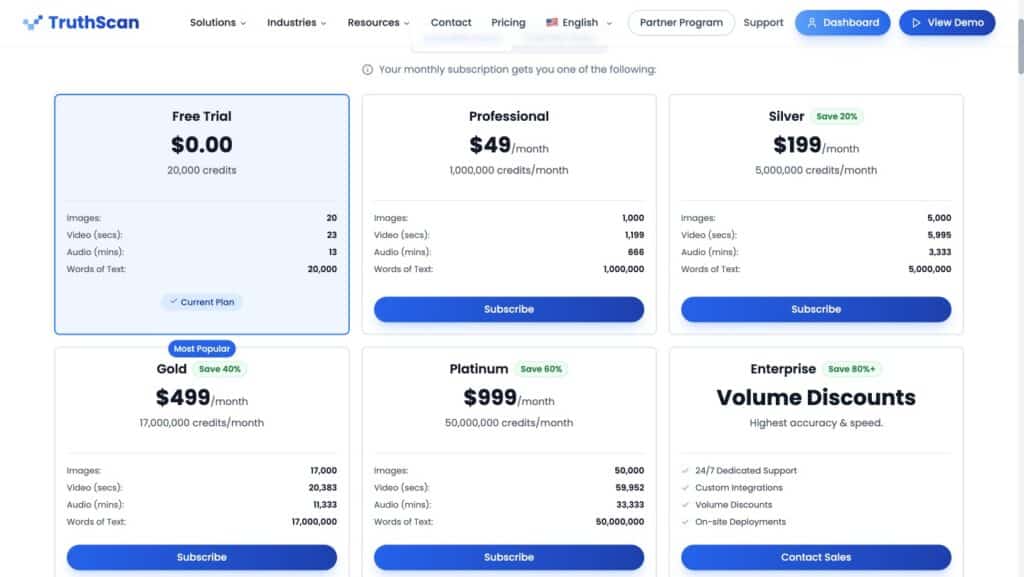
| Plan | Monthly Price | Credits/Month | Per-Image Cost | Best For |
|---|---|---|---|---|
| Starter Credits | $35 | 1,000 | $35.00 | One-off testing (skip this tier) |
| Free Trial | $0 | 20,000 (one-time) | Free | Evaluating the platform |
| Professional | $49 | 1,000,000 | $0.049 | Small team, moderate volume |
| Silver | $199 | 5,000,000 | $0.040 | Growing organization |
| Gold | $499 | 17,000,000 | $0.029 | Regular high-volume use |
| Platinum | $999 | 50,000,000 | $0.020 | Heavy enterprise scanning |
| Enterprise | Custom | Custom | Negotiated | On-site deployment, custom SLA |
Credit consumption per scan:
- Text: 1 credit per word
- Images: 1,000 credits per image
- Audio: 1,500 credits per minute
- Video: 50,040 credits per minute
On the Professional plan ($49/month), you can scan about 1,000 images, 20 minutes of video, or roughly a million words of text. Most small teams will live comfortably in Professional or Silver. Video-heavy workflows climb through the tiers fast.
The free trial — 20,000 credits, no credit card — is genuinely generous. I used about 4,000 credits running all the tests for this review and still had plenty left. Compare that to GPTZero giving you a few hundred words for free, or Originality.AI having no free tier. TruthScan’s trial is the biggest in the category.
Refund reality check: subscriptions are non-refundable. Usage charges are non-refundable. No money-back guarantee. Cancel anytime and billing stops at the end of your current period. This is why I keep saying use the free trial first. Once you pay, that money is gone even if you hate the tool.
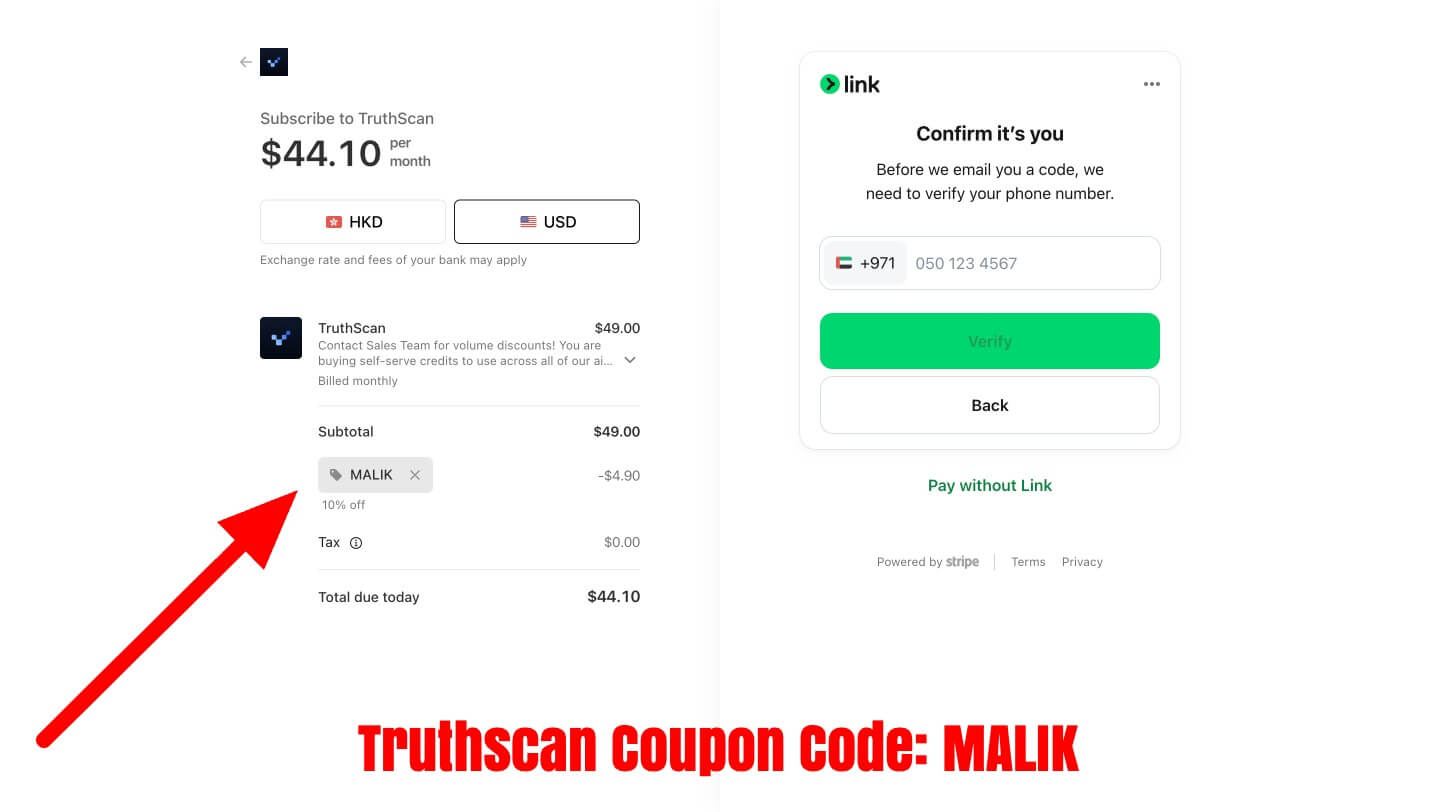
And yes, there’s a coupon. Use code MALIK at checkout for 10% off any paid plan (some plans get 20%). Discount is permanent — locks into your account forever.
The Good, The Bad, and The Kind of Weird
What I Liked
- Image detection accuracy is no joke. 99% on AI images, 97% recognition on real photos. Multiple independent testers back this up. If image authenticity is your thing, this is the best detector I’ve used.
- Speed. Sub-second results on images, 5-12 seconds on text. No loading spinners staring back at you.
- Truly multimodal. Six detection types in one dashboard. Text, images, audio, video, email scams, and document forgery. It’s not a text tool with an image add-on slapped on — each module feels like it was actually built, not bolted on.
- Enterprise-ready. SOC 2, ISO 27001, GDPR. API access from Professional up. Audit logs, SSO (Enterprise tier), SIEM integrations. If you’re a company worried about compliance, this stuff matters.
- Pattern explanations actually help. The detector tells you why it flagged something — specific linguistic patterns for text, visual artifacts for images. Not just a percentage and a shrug.
- Generous free trial. 20,000 credits, zero card required. That’s enough for ~20 image scans plus a solid chunk of text testing.
What Made Me Pause
- Quick Analysis vs Deep Analysis gap is annoying. 51% vs 72% on the same text is a big swing. If someone runs only the quick scan (which the interface kind of nudges you toward), they’ll get a misleading result. Deep Analysis should probably just be the default.
- Text false positives are a real issue. Independent reviewers have documented human-written text getting flagged as AI. TwainGPT reported 62% false positive rates in their testing. That’s not usable for academic grading or high-stakes decisions.
- Pricey for individuals. $49/month minimum for practical use. Compare that to GPTZero at $10/month or Sapling’s free tier. If you’re not an organization, TruthScan is probably overkill (and overpriced).
- No mobile app. Browser-only. In 2026, that’s notable.
- Video costs add up. ~$2.45 per minute of video on the Professional plan. Run a 10-minute clip and that’s $25 in credits. Ouch.
TruthScan vs the Competition
Here’s how TruthScan stacks up against the tools people actually compare it to:
| Tool | Best For | Text Accuracy | Image Detection | Multimodal? | Starting Price |
|---|---|---|---|---|---|
| TruthScan | Enterprise fraud prevention | ~72-94% (varies) | 96-99% (excellent) | Yes (6 types) | $49/mo |
| GPTZero | Academic text detection | High | No | No | $10/mo |
| Originality.AI | SEO/content marketing | Good | No | No | $14.95/mo |
| Copyleaks | Enterprise text + plagiarism | Good | Limited | Limited | $10.99/mo |
| Winston AI | Education/publishing | Good | Moderate | Limited | $12/mo |
| Sapling | Free text detection | 100% (in one test) | No | No | Free |
The pattern is pretty clear. If all you need is text detection, there are cheaper (and sometimes better) options. GPTZero for academia, Originality.AI for content teams, Sapling if you’re on a budget. But if your use case involves images or deepfakes — fraud detection, KYC verification, journalism verification, insurance claim review — TruthScan’s advantage is material. Nobody else in the comparison table does all six content types in one platform.
The Undetectable AI Thing (Yeah, Let’s Talk About It)
I can’t write this review without mentioning the obvious tension here. Christian Perry is CEO of both TruthScan (the AI detector) AND Undetectable AI (the tool that humanizes text to bypass AI detection). Forbes 30 Under 30, sure. Impressive resume. But the business model is…
Actually, let me be direct: it’s a weird setup. One company sells the detector. The other company sells the tool to beat the detector. And it’s the same guy running both. That’s like owning both the radar gun and the radar detector company. Legal? Probably. Does it raise questions? Absolutely.
Independent testing has found inconsistencies between how TruthScan and Undetectable AI’s built-in detector score the same text. One test showed Undetectable’s own detector rating a humanized text at 1% AI, while TruthScan rated the same text at 41% AI. The two products from the same CEO gave completely different answers on the same content. Whether that’s intentional or just different models — it’s not a great look.
Does this make TruthScan bad at its job? From my testing, no. The image detection especially is genuinely excellent. But if you’re an institution evaluating detection vendors, you should know this context. Some reviewers have flagged it as a trust issue, and I think that’s fair.
Final Verdict: Should You Use TruthScan?
After a full afternoon of testing — throwing AI text, synthetic images, real photos, and fake documents at every tool in TruthScan’s arsenal — here’s where I land.
For image and deepfake detection: yes, absolutely. 4.2/5. It’s the best detector I’ve tested for images. The speed is great, the accuracy held up on both AI and real content, and the pattern explanations give you something to work with beyond just a number. If you’re in journalism, insurance, KYC, or content moderation — this is probably your tool.
For text detection: more like 3/5. Deep Analysis works (72% on my fully-AI text is reasonable), but the Quick Analysis shouldn’t exist in its current form, and the false positive risk on human writing makes me uncomfortable recommending it for academic grading or anything with consequences. Use it as a signal, not a verdict.
For individuals: probably overkill unless you specifically need image/deepfake detection. The $49/month Professional plan is the minimum usable tier. If you’re a solo creator checking the occasional suspicious image, that free trial (20K credits, no card) will serve you well. After that, the math gets harder to justify.
Overall? 4 out of 5 stars. TruthScan does what it says — especially on images and deepfakes. The text detection has room to improve, and the ownership situation is awkward, but if you need a reliable multimodal detector, this is the strongest option available right now.
🎁 Want to try it? Grab 20,000 free credits + 10% off any plan with code MALIK at TruthScan →
More AI Detector & Verification Guides
Continue through the AI detector silo with our tested reviews, coupon guide, and related humanizer benchmarks.
Is TruthScan free?
There’s a free trial with 20,000 credits — no credit card required. After that, paid plans start at $35/month (1,000 credits — not recommended) or $49/month for the Professional tier (1,000,000 credits). The free trial is generous enough to test all detection types properly.
How accurate is TruthScan for text?
It varies. In my test, the Deep Analysis caught AI text at 72% (accurate — it was fully AI). But independent testers have found false positives — human writing flagged as AI. Gold Penguin reported 94% accuracy in controlled tests; TwainGPT had a worse experience with 62% false positives. Deep Analysis is more reliable than Quick Analysis. Don’t use it as the sole basis for academic decisions.
Can TruthScan detect AI-generated images?
Yes — and it’s really good at it. In my test it scored an AI-generated portrait at 99% and a real iPhone photo at 3%. Independent tests back this up: 96-99% accuracy across multiple image generators (DALL-E, Midjourney, Stable Diffusion, FLUX). This is TruthScan’s strongest feature.
How does TruthScan compare to GPTZero?
Different tools for different jobs. GPTZero is text-only and better suited for academic integrity (more consistent text accuracy, fewer false positives). TruthScan offers multimodal detection — images, voice, video, documents — that GPTZero doesn’t touch. If you need image or deepfake detection, TruthScan wins. For pure text, GPTZero is more reliable and cheaper.
Who owns TruthScan?
Christian Perry, who also founded and runs Undetectable AI (the AI text humanizer). Yes — the same person owns both an AI detector and a tool to bypass AI detection.
Does TruthScan have a money-back guarantee?
No. Subscriptions and usage charges are generally non-refundable. Cancellation stops future billing but doesn’t refund current period. Use the free trial before you pay.
Is there a TruthScan coupon code?
Yes. Use code MALIK for 10% off any plan (20% on some plans). The discount is permanent — it stays on your account as long as you keep the subscription.