
Pricing checked on 4 October 2026: the tables use the official pricing cards. Discounted figures are calculations assuming MALIK is accepted for 15% off, including annual billing. Confirm stacking and renewal terms at checkout. Original test screenshots remain below.
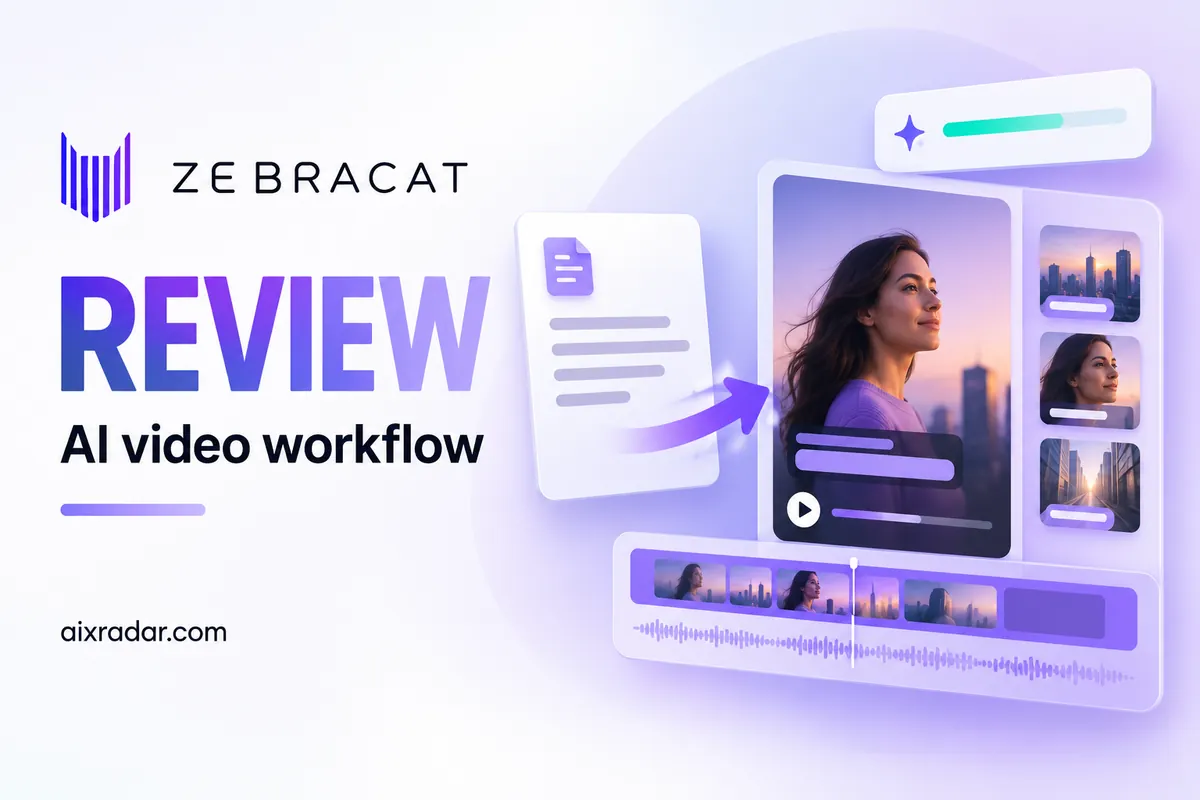
I spent two weeks testing Zebracat AI on a Super Cat plan (gifted by their CEO — full disclosure upfront). I created custom avatars, ran the built-in avatar library, tested Blog to Video, and tracked every credit I burned. Here’s what actually works, what’s still rough, and whether the price is worth it.
Quick verdict: Zebracat is fast, the built-in avatars are legitimately impressive, and voice cloning works well. The custom avatar has visible teeth artifacts, and the “script generation” tool is misleadingly named — it doesn’t write scripts. Overall I’d give it a 4.1/5 for AI video generation.
🎁 Exclusive: Use code MALIK for 15% off any plan → Try Zebracat with the discount →
What Is Zebracat AI?
Zebracat is an AI video generator that turns text, scripts, and blog posts into finished videos with AI-generated voiceovers, stock footage, captions, and music. It sits in the same category as Pictory, InVideo, HeyGen, and Synthesia — but its main differentiator is the AI avatar quality and the speed of processing.
The platform uses multiple AI models under the hood (VEO3, Kling, Nano Banana, Pixverse) for video generation. You can pick from 43 built-in AI avatars, clone your own voice, create a custom avatar from uploaded footage, or generate videos purely from text prompts without any avatar at all.
It’s designed for creators, marketers, and small business owners who need short-form video content for TikTok, YouTube, Instagram, LinkedIn, and other social media platforms. The pitch is “create videos 10x faster” — and based on my testing, the speed claim is accurate.
How I Tested Zebracat
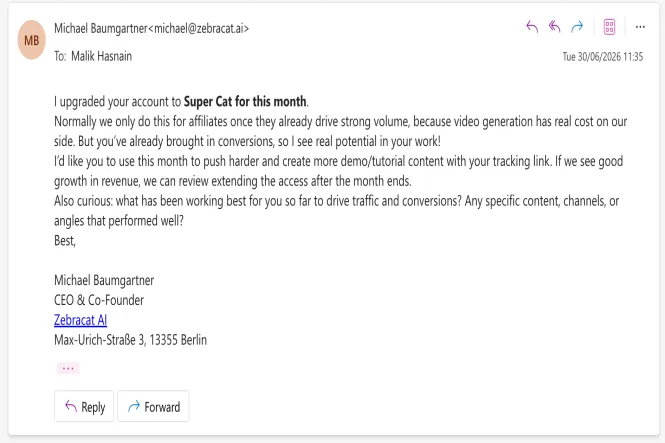
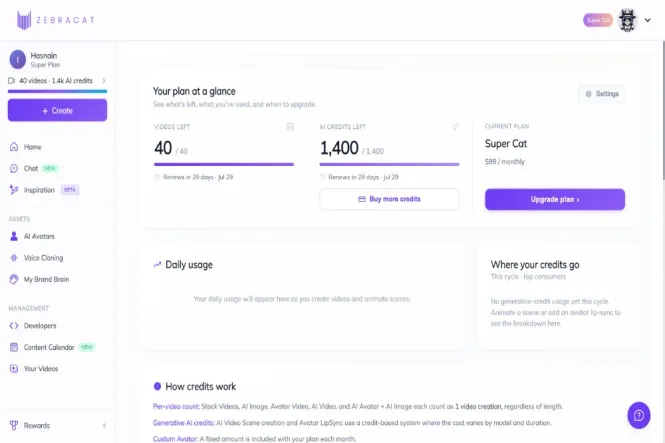
Before diving into the review, full disclosure: Michael Baumgartner, Zebracat’s CEO and co-founder, upgraded my account to Super Cat for one month after he saw that my AI tool reviews were driving traffic to the platform. That gave me access to 40 videos and 1,400 credits in Super Cat mode — the full feature set, including AI avatars, voice cloning, and Blog to Video.
This upgrade doesn’t change my review approach. I’ve published honest reviews of tools that gave me free access before (including Pictory), and I’ll call out problems when I find them. You can see the negatives in this review — custom avatar artifacts, misleading “script generation,” Blog to Video auto-script issues — all of which Zebracat’s team knows about and is actively working on.
Key Features (And What I Actually Tested)
1. Custom AI Avatar Creation
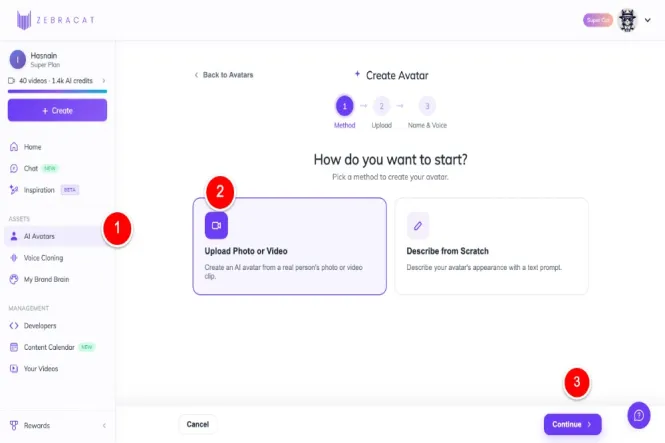
To create my custom avatar, I navigated to the AI Avatar section in Zebracat’s sidebar and clicked “Create AI Avatar.” I uploaded a 4-minute video of myself speaking and named the avatar “Malik Hasnain.”
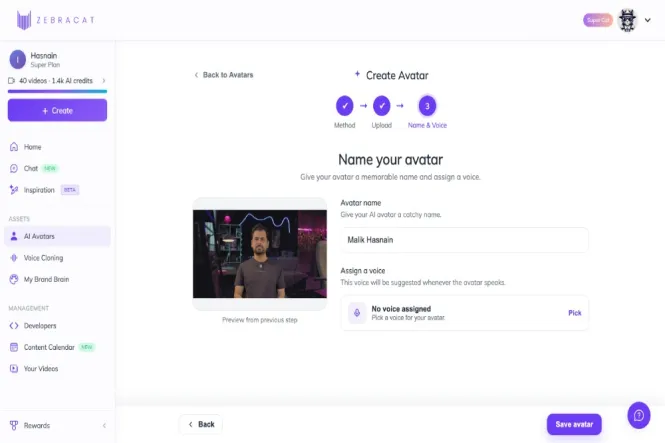
I also uploaded the audio from the same video to clone my voice. I’ve used the exact same audio and video file on HeyGen, which gave me a perfect apples-to-apples comparison point.
Speed result: Zebracat processed both my avatar and voice clone in 2 minutes. HeyGen took noticeably longer for the same input. That’s a real edge for Zebracat.
2. Built-In AI Avatars (The Real Standout)
After testing the custom avatar, I tried one of Zebracat’s built-in avatars (AMELIA) with the same script. The result was genuinely surprising.
What I found:
- Facial expressions looked natural and lifelike — the avatar showed genuine expression while speaking
- Skin texture, lighting, and movement all looked professional
- Lip sync was solid — mouth movements aligned well with the audio track
- Processing was fast (2 minutes for a 30-second video)
This is where Zebracat has a real edge over some competitors. The built-in avatars are among the most realistic I’ve tested across HeyGen, Synthesia, and other AI video tools. The key insight: choose the right avatar for your script. AMELIA is better for product/talk-style content — I picked the wrong avatar for my historical lost cities script, and the pre-sequenced gestures (smile, head movement) didn’t quite match the tone. Lesson learned.
Zebracat has 43 built-in AI avatars covering a range of use cases — business presentations, product demos, educational content, news-style delivery, and more. Browse the full library and preview before committing.
3. Voice Cloning
Voice cloning quality matched what I got from HeyGen with the same audio file — clear, natural, and accurate to my speaking style. The 2-minute processing time is impressively fast. If voice cloning is a key feature for you (e.g., for podcast-to-video content or personal brand videos), Zebracat handles it well.
4. Text-to-Video (No Avatar)
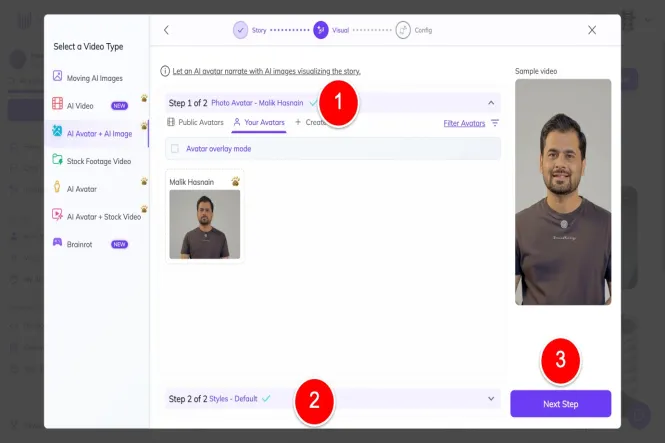
I tested the text-to-video pipeline by pasting a script and selecting the pre-production settings. The system generates a video with AI voiceover, stock footage, captions, and background music. Quality was good — captions were accurate, music selection was appropriate, and stock footage matched the script’s context.
This is the feature most people will use most often, and it works reliably.
5. Blog to Video
I tested Blog to Video with two approaches. First, I used a news article with Zebracat’s default auto-script generation. The output felt generic and didn’t capture the angle I wanted. Then I generated a better script using my own AI agent and pasted it into Zebracat — that version was significantly better.
Takeaway: Bring your own script. Zebracat’s auto-generated scripts from articles are functional but weak. The video production step is excellent; the scriptwriting step is the weak link.
6. Credit System
The 30-second AI avatar preview used 22 lip sync credits. That’s roughly 1 credit per second of generated video. With 1,400 credits in Super Cat mode, you’re looking at about 23 minutes of AI avatar video content per billing cycle.
This is a meaningful constraint. If you’re producing long-form content (5+ minutes per video), you’ll burn through credits fast. Short-form content (30-60 second clips) works well within the credit budget. Every AI video generator is moving toward credit-based pricing — this is the new industry standard, and Zebracat is on par with competitors on the math.
Zebracat AI Pricing: Recorded Plan Examples
The figures and screenshots below document the earlier review. See our Zebracat pricing guide for the published plan details and remaining official-source conflicts.
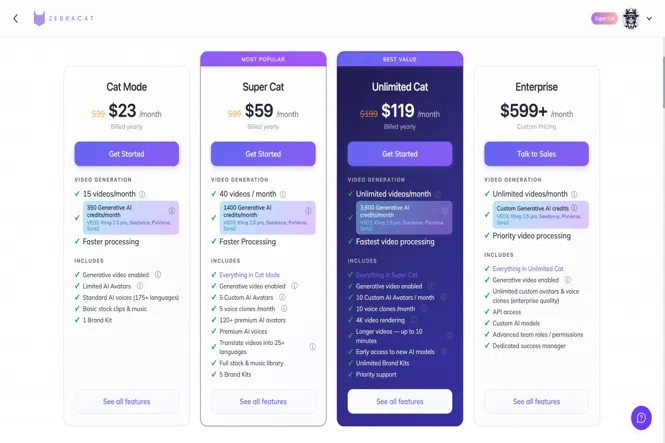
| Plan | Monthly Price | Annual (per month, billed yearly) | Credits/Month | Key Features |
|---|---|---|---|---|
| Free | $0 | $0 | Check account | 30s videos, 720p, Zebracat watermark |
| Cat Mode | $39/mo | $23/mo ($276/yr) | ~350 | Limited avatars, standard voices, 1 brand kit, 1080p |
| Super Cat | $99/mo | $59/mo ($708/yr) | ~1,400 | 5 custom avatars, 5 voice clones, full stock library, 5 brand kits, faster processing |
| Unlimited Cat | $199/mo | $119/mo ($1,428/yr) | ~3,600 | Unlimited videos, 10 custom avatars, 10 voice clones, unlimited brand kits, priority support |
| Enterprise | $599+/mo | Custom | Custom | API, custom credits/models, dedicated success manager |
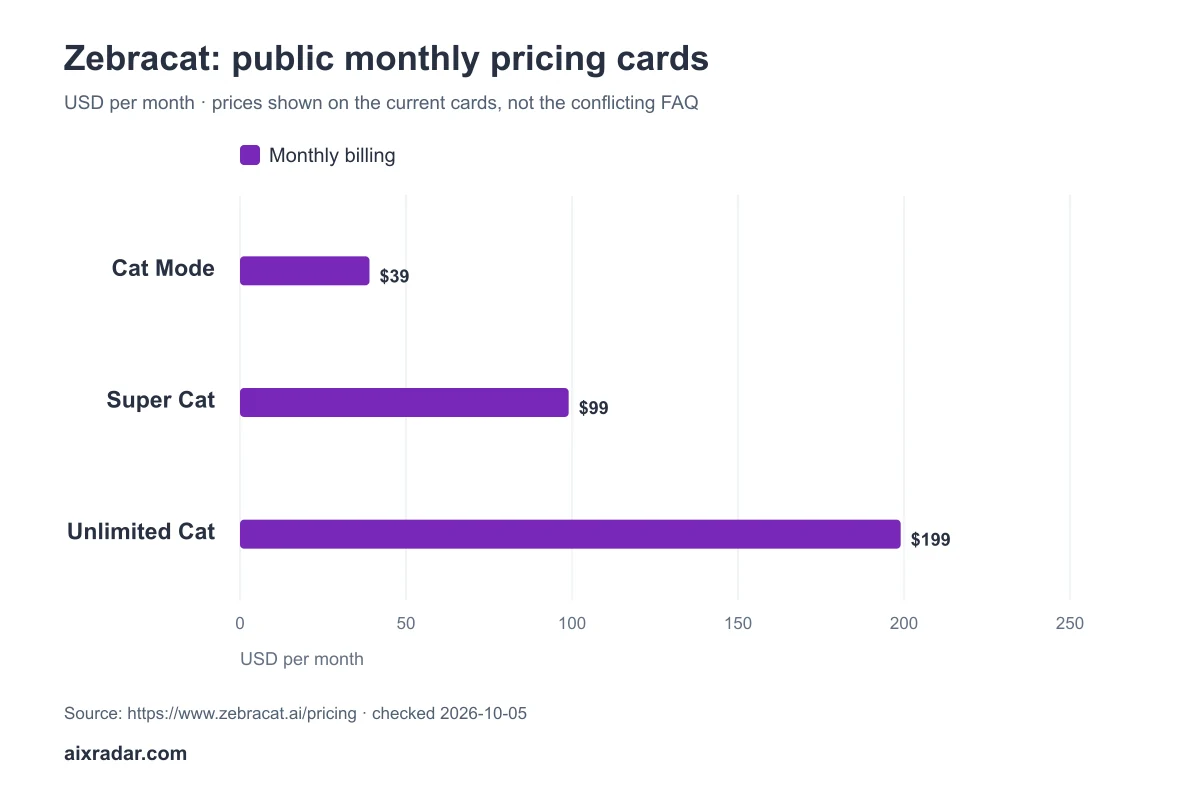
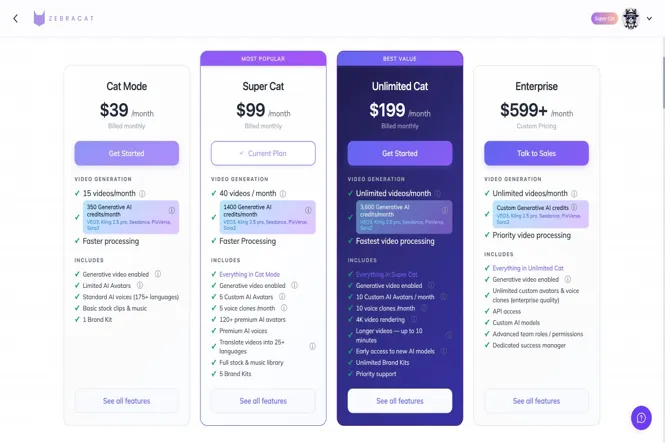
Best value: Super Cat on annual. With code MALIK for 15% off, you’re looking at $50.15/month for the full feature set. That’s the sweet spot for most creators and marketers.
💰 Save with code MALIK → Get 15% off Zebracat →
Full pricing breakdown and savings math is on my Zebracat coupon code page.
Pros and Cons
What I Liked
- Built-in avatars are exceptional. Among the most realistic I’ve tested — natural expressions, solid lip sync, professional quality. If you choose the right avatar for your script, the output rivals much more expensive platforms.
- Extremely fast processing. Avatar creation in 2 minutes. Video generation in 2 minutes. Compared to HeyGen (where avatar training took noticeably longer), Zebracat’s speed is a real competitive edge.
- 43 built-in avatars. Wide range of use cases covered — business, product demos, education, news-style delivery.
- Voice cloning quality matches HeyGen. Same audio file, comparable result, faster processing.
- Transparent credit system. 1 credit = 1 second of AI avatar video. You know exactly what you’re getting.
- Multi-model AI generation. Uses VEO3, Kling, Nano Banana, Pixverse — not locked to a single model.
- Annual + coupon stacking is good value. Super Cat at $50.15/month (annual + 15% off) is competitive for the feature set.
What Needs Improvement
- Custom avatar has visible artifacts. My digital twin’s teeth and eye movements are not accurate. The result is usable but not great — HeyGen’s custom avatars are more polished here.
- “Script generation” doesn’t write scripts. I clicked “Generate Script” twice, expecting AI to write a 30-second script from my prompt. Instead, it just used the prompt text as the script. You need to bring your own script (I used Claude). The feature name is misleading.
- Blog to Video auto-script is weak. Default scripts generated from articles feel generic. If you want quality, you need to write or generate the script yourself first.
- Pre-sequenced avatar gestures may not match your script. Each built-in avatar has pre-programmed actions (smile, head movement, hand gestures) that play in a set pattern. If those gestures don’t fit your content’s tone, the video will feel off.
- Limited custom avatar customization. You can’t change wardrobe, setting, or appearance — it’s just a digital twin of whatever footage you uploaded.
- Credit system limits output volume. 1,400 credits = ~23 minutes of AI avatar video in Super Cat mode. Long-form content is constrained.
- Refund policy is contradictory. Pricing page mentions 7-day money-back guarantee. Help docs say no refunds. Assume the conservative interpretation.
Who Should Use Zebracat?
Great for:
- Content creators producing short-form videos (TikTok, Instagram Reels, YouTube Shorts) weekly
- Marketers who need professional-looking avatar videos for product demos, explainers, or social media ads
- Small business owners who don’t want to be on camera but need video content
- Agencies producing high volumes of short-form content (Unlimited Cat makes sense here)
- Anyone who values speed — Zebracat’s processing is consistently fast
Not ideal for:
- Long-form video production (the credit system makes this expensive)
- Users who need pixel-perfect custom avatars (HeyGen is better here)
- Anyone who wants AI to write their scripts (Zebracat doesn’t — bring your own)
- Budget-conscious users who only need occasional videos (the free plan is intended for testing)
Zebracat vs Alternatives (Quick Comparison)
| Tool | Starting Price | Best For | Key Difference |
|---|---|---|---|
| Zebracat | $23/mo (annual) | AI avatars + text-to-video | Fast processing, realistic built-in avatars, good voice cloning |
| Pictory | $25/mo | Text-to-video editing | More mature, better for repurposing long-form content into shorts |
| HeyGen | $29/mo | Custom avatars | Better custom avatar quality, slower processing |
| Synthesia | $18-29/mo | Enterprise avatars + localization | More avatar variety, enterprise-focused, pricier at scale |
| InVideo | $20-60/mo | Template-based video editor | More manual control, larger stock library, steeper learning curve |
For a deeper comparison, my Pictory AI review covers the main alternative head-to-head. A dedicated Zebracat vs HeyGen comparison is coming soon — I have the data from testing both with the same audio file.
How Much Can You Save?
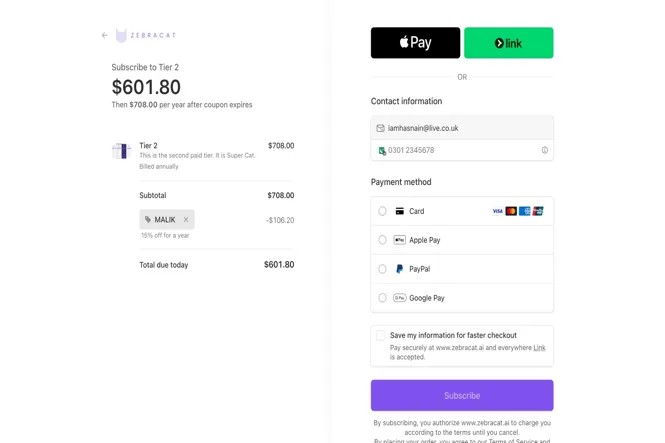
Using code MALIK at checkout gives you 15% off any plan. That stacks on top of the annual billing discount (40%), so Super Cat on annual goes from $99/month to $50.15/month. Over a year, that’s $586.20 in savings.
Use MALIK to check the offer in your account. Coupon acceptance, stacking and renewal terms can change; we do not claim it is the largest discount available everywhere.
See full savings breakdown on the Zebracat coupon page →
Zebracat Reviews: What Customers Say
Beyond my own testing, here’s the broader user sentiment:
- Trustpilot: ~4.5/5 across 295 reviews. Common praise: ease of use, speed, feature set. Common complaints: customer support response time, occasional export failures.
- G2: ~4.8/5 across 20-30 reviews. Positive: the avatar quality and the multi-model AI approach. Negative: occasional stability issues during peak hours.
- AppSumo: Mixed. Lifetime deal buyers had complaints about credit allocation changes after purchase — worth noting if you’re considering a LTD instead of the standard plans.
- Reddit r/SaaS: A January 2026 thread asked if Zebracat is the best AI short video software. The top responses were cautiously positive — most users said it’s solid for the price but not a clear “best” winner.
The pattern: most users like Zebracat for the built-in avatar quality and the speed. The main frustration is around the credit system limits and occasional support delays. That matches my own experience.
Final Verdict
Zebracat is a fast, capable AI video generator with genuinely impressive built-in avatars. The credit system and the custom avatar quality are the main friction points, but for the price — especially with the MALIK coupon bringing Super Cat down to $50.15/month on annual — it’s a solid deal for short-form content production.
If your primary use case is AI avatar videos for social media and you need fast turnaround, Zebracat is worth trying. If you need pixel-perfect custom avatars or long-form content, look at HeyGen or Pictory instead.
Rating: 4.1/5
- Built-in avatar quality: 5/5
- Speed: 5/5
- Custom avatar quality: 3/5
- Script generation: 2/5 (misleading feature)
- Pricing value: 4/5
- Ease of use: 4/5
🎁 Try Zebracat with 15% off using code MALIK →
Want a side-by-side breakdown? My Pictory review covers the main alternative, and a dedicated Zebracat vs HeyGen comparison is in the works.
Frequently Asked Questions
Is Zebracat AI worth the money?
For short-form AI avatar videos specifically, yes. The built-in avatars are realistic, processing is fast, and with code MALIK, Super Cat runs $50.15/month on annual. If you need long-form content or pixel-perfect custom avatars, HeyGen or Pictory might be better fits.
How much does Zebracat cost per month?
Plans range from a free test plan to $199/month for Unlimited Cat. The sweet spot is Super Cat at $99/month (or $59/month on annual). With code MALIK, that drops to $50.15/month on annual billing.
Is Zebracat better than HeyGen?
Depends on your use case. Zebracat’s built-in avatars are more realistic and processing is faster. HeyGen’s custom avatars are more polished and the platform has more enterprise features. If you need a digital twin of yourself specifically, HeyGen is the better choice. If you need fast, high-quality built-in avatar videos, Zebracat wins.
Can you use Zebracat for YouTube?
Yes. The output is 1080p, which meets YouTube’s minimum resolution. Some creators use Zebracat’s AI avatars for faceless YouTube channels — I’m planning a dedicated case study on this for a future post. The key question is monetization: YouTube’s policies on AI-generated content are evolving, so check current guidelines before building a channel around it.
Is Zebracat AI Free?
Yes. Zebracat’s help centre confirms a free plan with no credit card required. Its public pages give conflicting numerical allowances, so this review does not promise a fixed number of free videos or a particular reset schedule. Premium avatars and voice-cloning access require a subscription.
What AI models does Zebracat use?
Zebracat uses multiple AI models for video generation, including VEO3, Kling, Nano Banana, Pixverse, and Seedance. This multi-model approach means you’re not locked to a single provider’s quality or pricing — if one model has a better output for your content, you can switch.
Does Zebracat have a money-back guarantee?
Zebracat’s pricing page mentions a 7-day money-back guarantee if you haven’t downloaded any videos. Their help documentation says subscriptions are non-refundable due to AI compute costs. These statements conflict — assume the conservative interpretation and use the free plan to test before paying.
How long does it take to create an AI avatar in Zebracat?
About 2 minutes. I uploaded a 4-minute training video and Zebracat processed both the avatar and voice clone in 2 minutes. HeyGen took noticeably longer for the same input — Zebracat’s speed here is a real competitive edge.
For the offer details and worked savings, see our Zebracat coupon guide with code MALIK. Check the final total and renewal terms before subscribing.