
Looking for a Muse AI invite code? Eligible new users can redeem a shared code for 1 billion Muse tokens, with the same reward going to the inviter. The key step is entering the code inside Muse within 48 hours of joining—copying a code or opening a link does not claim the bonus.
This guide puts the codes first, shows where to redeem one, and explains what Meta’s personal AI agent can do once you are set up. The reward and deadline are documented in Meta’s official referral reply; the screenshots below are credited product and community examples.
Muse AI invite codes available to try
AIX Radar’s publisher confirmed these eight codes as active on 18 October 2026 and supplied the remaining-use counts below. These are dated reports, not live counters. Other people can redeem a shared code after a count is recorded.
| Muse invite code | Uses remaining, reported 18 October |
|---|---|
VSBJ1N |
23 |
W2II0Q |
7 |
0KDJT6 |
30 |
P0HQYB |
29 |
KS0LCR |
30 |
NOFDDW |
30 |
DPZG7V |
30 |
E005DB |
30 |
Copy the complete code rather than retyping it. In this list, 0KDJT6 begins with the number zero; NOFDDW contains the letter O; and W2II0Q contains two capital I characters followed by zero. Keep the characters unchanged and remove any spaces introduced while copying.
The codes are free to copy. Muse handles account access and rewards; AIX Radar cannot reserve a slot or add tokens to your balance.
How to redeem a Muse AI invite code
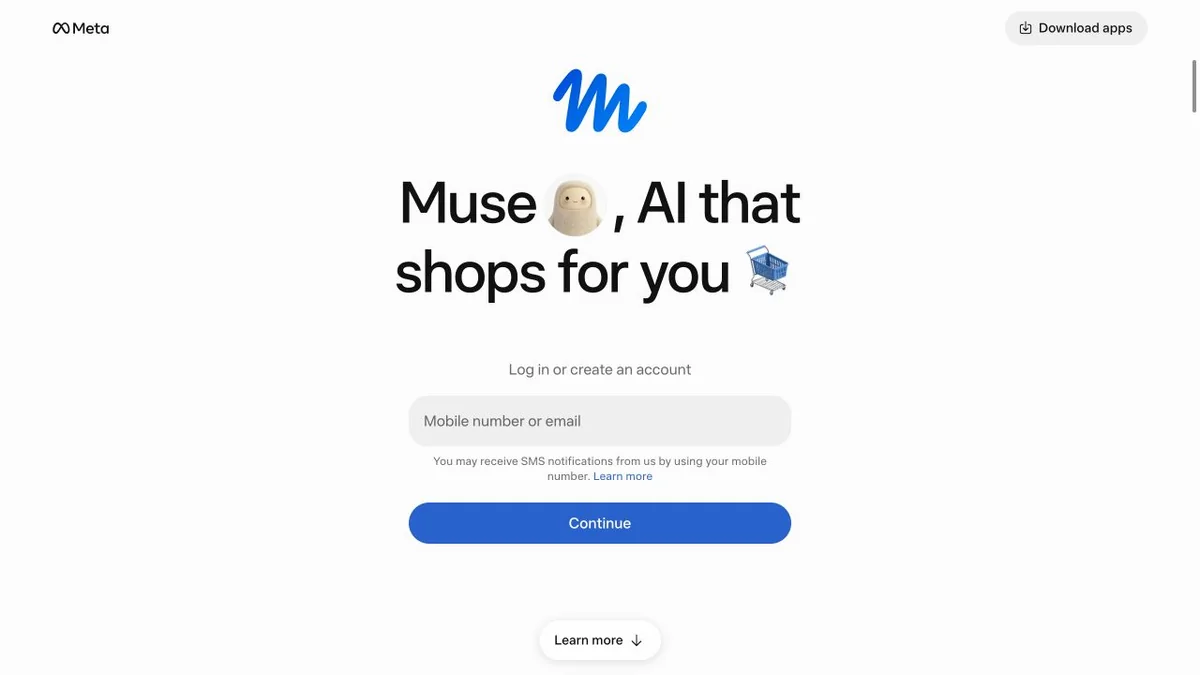
1. Sign in or create your Muse account
Start at the official Muse join page or the official app. Meta’s getting-started guide explains that Muse uses a Meta account, with account creation options including an email address, phone number, Facebook or Instagram account. Complete the setup prompts for your account.
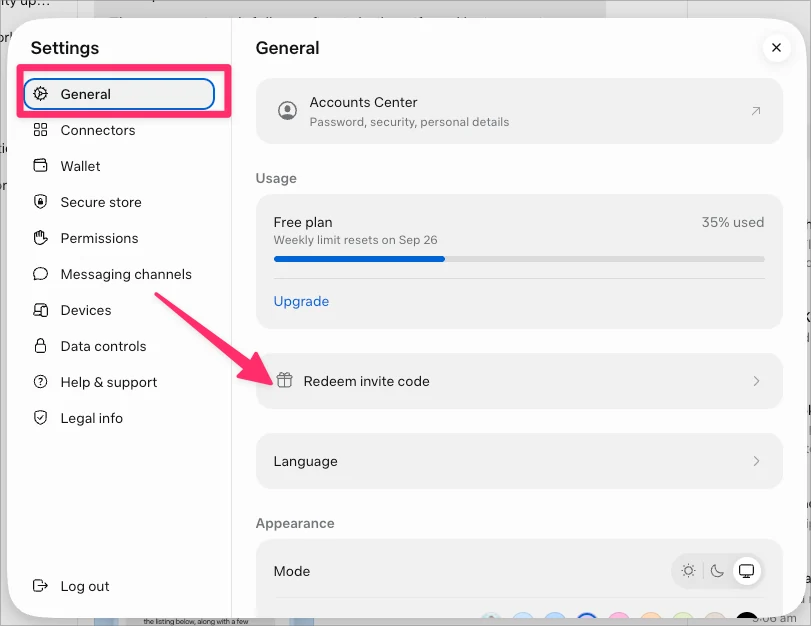
2. Open Settings, then General
Select Redeem invite code. In the user-shared desktop screenshot below, it appears immediately below the Usage panel. This matches the path in Meta’s referral reply. App layouts can change, so follow the redemption control shown in your version.
3. Enter one code and confirm
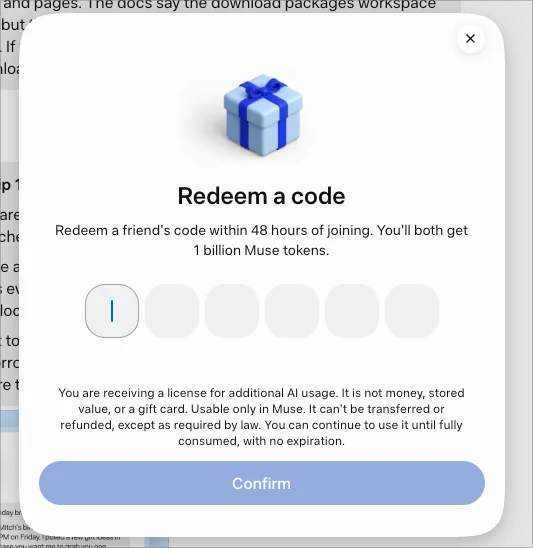
Paste a code from our table into the redemption form. The example below shows six entry boxes and a Confirm button. Review the displayed offer, submit once, and wait for Muse’s response before doing anything else.
4. Check the confirmation and bonus balance
Look for Muse’s success message and review the usage or reward information in the same account. A copied code is not proof of redemption. If the app reports an error, keep its wording so you can identify the problem or explain it to support.
Timing matters: Meta’s instructions specify 48 hours after joining. Choosing a different code does not restart that account deadline. We have no verified extension or reset method.
What does the one-billion-token bonus include?
The referral reward gives additional Muse usage to the eligible new user and the inviter. Meta’s reply describes the claimed bonus pool as non-expiring. That is different from the deadline to claim it: 48 hours to redeem, then no stated expiry for the awarded pool.
The redemption dialog also makes clear that this is a license for AI usage in Muse, not money, a gift card or transferable credit. Do not treat it as a cryptocurrency balance or assume it can be withdrawn.
There is no reliable fixed conversion from a billion tokens into a number of finished projects. A brief request and a multi-step task involving documents, browsing and revisions can consume different amounts of usage. Judge the benefit by the work you complete and the balance your account actually shows.
Keep three numbers separate: your account’s recurring allowance, the referral bonus pool, and the number of people who can still use a particular invite code. “30 uses left” in a code list does not mean 30 tokens or 30 days of access.
What is Muse AI, and what can it do?
Muse is Meta’s personal AI agent. Meta describes it as software that can work on goals using its own cloud computer and browser, with the user deciding which services it can access. Tasks can continue in the background, with requests for approval when needed. See Meta’s launch announcement.
Organize ongoing work and follow progress
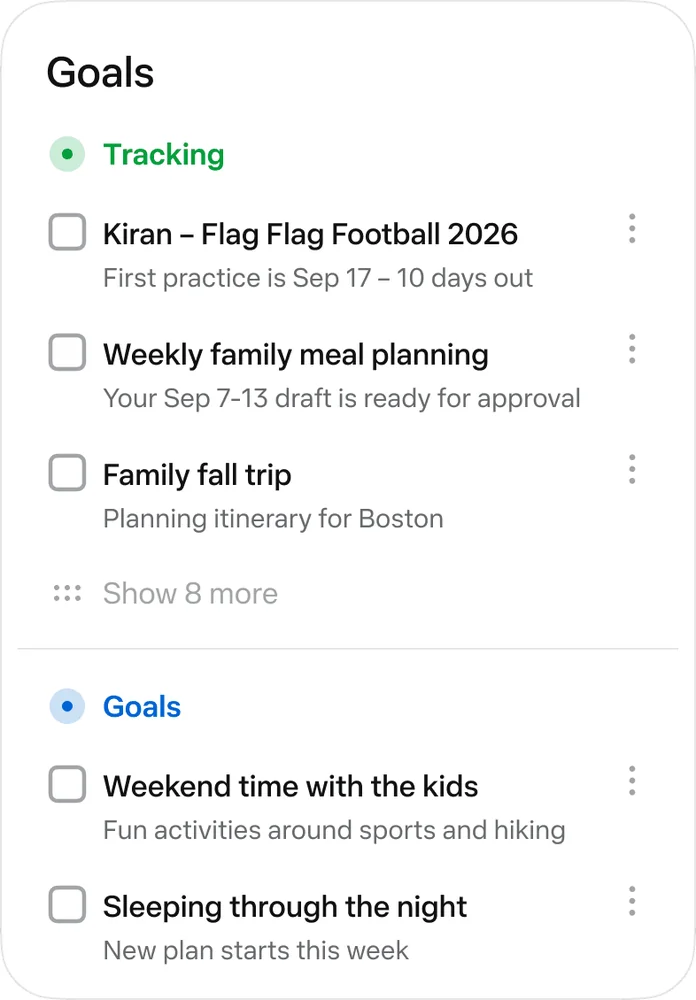
Meta’s design article shows a Goals view for ongoing plans and an activity view for tracking work. These are useful distinctions: a conversation records what you asked, while a progress view helps you see what is happening. The examples shown here come from Meta, not our own account.
Create useful files and interactive outputs
Muse can produce documents and interactive artifacts such as plans, trackers and dashboards. Meta illustrates the feature with a trip plan, a school information sheet and a packing checklist. Specify the output you need—for example, an editable checklist with dates—rather than asking for a vague summary. Source: How We Designed Muse.

Connect services while retaining approval controls
Connections let Muse work with services such as email and calendars. Meta describes a separate permission system, Sentinel, and secure credential storage in its security explanation. Review the scope of each connection and the details of requested actions. These controls help manage access; they do not make every generated answer or action correct.
If you are comparing this with a conversational assistant, our guide to ChatGPT’s Intelligent UI explains another approach to visual and interactive answers.
Free usage, subscriptions and model access
Muse offers limited free usage. Meta’s subscription guide lists Power at $20 per month with 500 million tokens per week, and Maximum at $100 per month with 3 billion per week. Benefits and availability vary by account and region; subscriptions renew monthly unless cancelled.
The invite reward is separate from those recurring allowances. It should not be presented as a free paid subscription or a guarantee of every model and feature. In its 12 October Muse Wonder announcement, Meta described rollout to Muse as forthcoming and beginning with subscribers. That announcement does not establish universal Wonder access for referral users.
Useful first tasks after redeeming your code
Begin with a small task whose output you can check. These are suggested prompts, not tasks we ran or measured:
- For creators: “Turn these five video ideas into a seven-day production checklist. Include the assets I need and leave unknown facts blank.”
- For students: “Use these notes to make a revision schedule and practice questions. Flag anything the notes do not explain.”
- For small businesses: “Compare these three supplier quotes in a table. Include delivery dates, exclusions and questions to ask. Do not place an order.”
Review the first result before expanding the task or connecting more accounts. A defined output, named source material and a clear stopping point make the result easier to assess. For meeting-specific workflows, our Otter AI pricing and usage-limit guide offers a more focused comparison point.
Muse invite code not working? Start with the message
- Invalid code: Copy it again, check similar-looking characters and remove spaces.
- No uses remaining: Try another listed code while your account is still eligible. The counts above are a dated publisher report.
- No redemption option: Check that you are signed in to Muse and within the joining window. If it is still missing, use Muse’s help controls.
- Code accepted but no visible bonus: Recheck the same account’s usage information and keep the confirmation for support.
- Signup or location restriction: Follow Muse’s account-access requirements. An invite reward is not permission to bypass them.
Do not delete your account or pay someone to “unlock” a referral bonus. We have no verified basis for claiming either action restores eligibility.
Muse AI invite code FAQs
How many tokens can I get with an invite code?
Meta’s official referral reply describes one billion tokens for an eligible new user and one billion for the inviter after successful redemption.
Can I redeem all eight codes for eight billion tokens?
We have not verified a rule allowing multiple signup bonuses on one account. The list provides alternative codes; it is not a promise of stacked rewards.
Do I need to buy a subscription?
The referral instructions do not specify a paid-plan purchase to redeem the code. Muse also offers limited free usage. Buying a subscription is a separate decision.
Do the bonus tokens expire after 48 hours?
No. Meta describes 48 hours as the joining-to-redemption window and the awarded bonus pool as non-expiring. Those are different conditions.
Are the screenshots from AIX Radar’s testing?
The signup screenshot was captured by AIX Radar. The two redemption images were publicly shared by Gina Wang; the feature illustrations were published by Meta. We have not claimed a successful redemption or measured Muse’s task performance.
Start with the code, then a task you can review
Choose one listed code, redeem it inside Muse within the joining window, and confirm the result in your account. Once the bonus is credited, use it on a specific task with a clear output. The useful outcome is work you can inspect and reuse—not simply a large token balance.